
SingleStore Notebooks

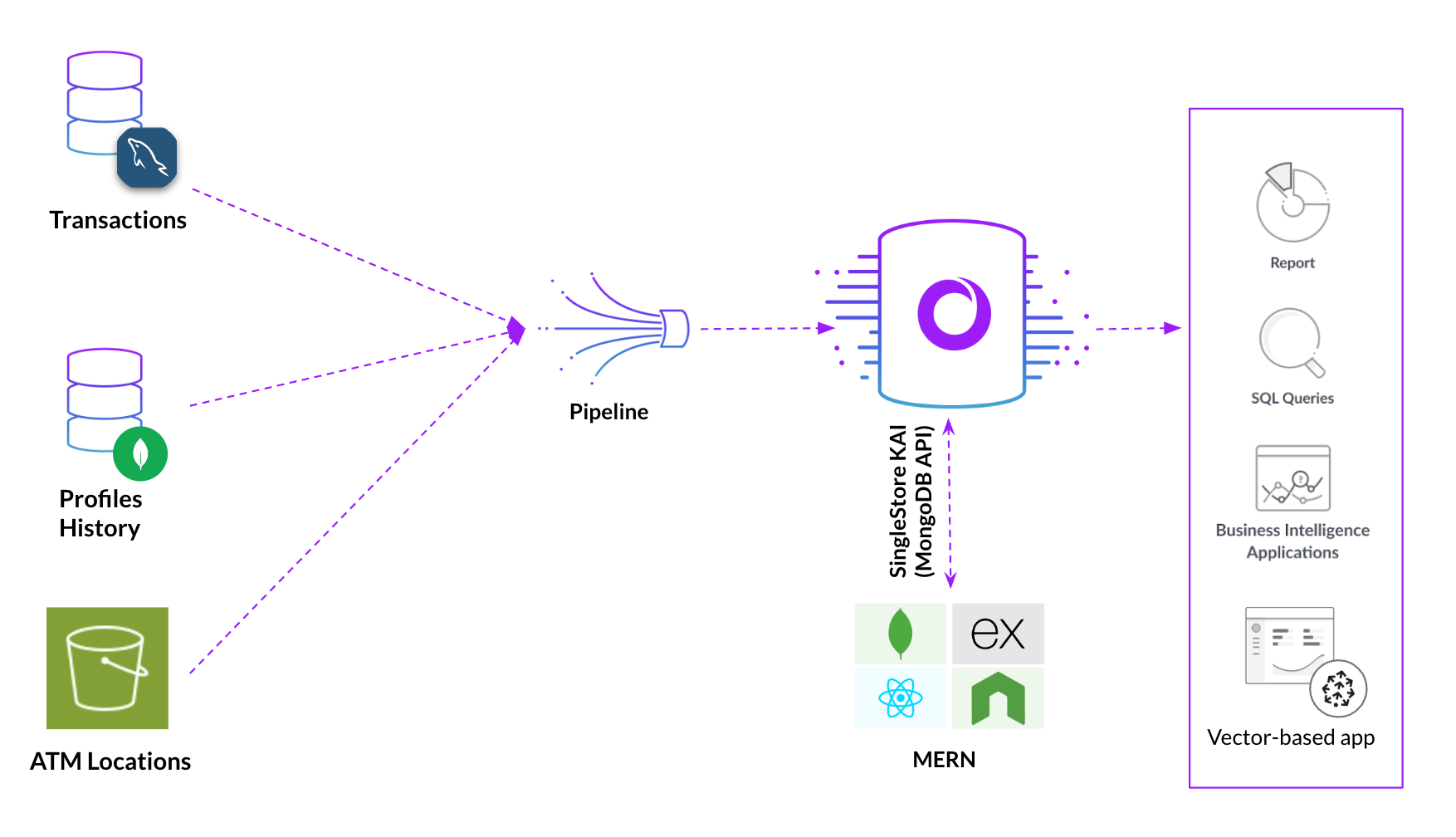
In this notebook we ingest data from different sources like MySQL, MongoDB and S3 into a single SingleStore database, and analyze relational and JSON (document) data together using SQL.
Setup CDC from MongoDB and MySQL in easy steps. Replicate data in real-time and ensure upto date information for analytics, eliminating the need for complex tooling for data movement
Load reference data from S3 with pipelines, then join documents from MongoDB with relational tables from MySQL and S3 in a single SQL query. Perform familiar SQL queries on your NoSQL data!
Ready to unlock real-time analytics and unified data access? Let's start!
This example gets banking data from three different sources: ATM locations from S3, transaction data from MySQL and user profile details from MongoDB databases. Joins data from different sources to generate rich insights about the transactional activity across user profile and locations across the globe
In [1]:
1%%sql2DROP DATABASE IF EXISTS BankingAnalytics;3CREATE DATABASE BankingAnalytics;
Action Required
Make sure to select 'BankingAnalytics' database from the drop-down menu at the top of this notebook. It updates the connection_url to connect to that database.

In this step, we create a link from a MySQL instance and start the pipelines for the CDC.
Bring your own MySQL instance
The shared demo MySQL instance this notebook used has been deprecated and is no longer available. Replace the placeholders below with your own MySQL connection details:
<MYSQL_HOST>: hostname or IP of your MySQL instance
<MYSQL_DATABASE> / <MYSQL_TABLE>: the database and table to replicate
<MYSQL_SSL_MODE>: e.g. required, preferred, or disabled
<MYSQL_USER> / <MYSQL_PASSWORD>: credentials with REPLICATION SLAVE, REPLICATION CLIENT, and SELECT privileges
In [2]:
1%%sql2CREATE LINK mysqllink AS MYSQL3CONFIG '{4 "database.hostname": "<MYSQL_HOST>",5 "database.exclude.list": "mysql,performance_schema",6 "table.include.list": "<MYSQL_DATABASE>.<MYSQL_TABLE>",7 "database.port": 3306,8 "database.ssl.mode":"<MYSQL_SSL_MODE>"9 }'10CREDENTIALS '{11 "database.password": "<MYSQL_PASSWORD>",12 "database.user": "<MYSQL_USER>"13 }';
In [3]:
1%%sql2CREATE TABLES AS INFER PIPELINE AS LOAD DATA LINK mysqllink "*" FORMAT AVRO;
In [4]:
1%%sql2START ALL PIPELINES;
This steps loads data from S3, this requires the tables to be defined beforehand
In [5]:
1%%sql2CREATE TABLE IF NOT EXISTS atm_locations (3 id INT PRIMARY KEY,4 name VARCHAR(255),5 address VARCHAR(255),6 city VARCHAR(255),7 country VARCHAR(255),8 latitude DECIMAL(9, 6),9 longitude DECIMAL(9, 6)10);
In [6]:
1%%sql2CREATE PIPELINE atmlocations AS3LOAD DATA S3 's3://ocbfinalpoc1/data'4CONFIG '{"region":"ap-southeast-1"}'5SKIP DUPLICATE KEY ERRORS6INTO TABLE atm_locations;
In [7]:
1%%sql2START PIPELINE atmlocations
Now we setup CDC from MongoDB to replicate the data to SingleStore.
The collections to be replicated are specified as a comma separated or in a wildcard format in "collection.include.list".
Bring your own MongoDB instance
The shared demo MongoDB instance this notebook used has been deprecated and is no longer available. Replace the placeholders below with your own MongoDB connection details:
<MONGODB_HOSTS>: one host, or a comma separated replica set list
<MONGODB_COLLECTION_INCLUDE_LIST>: the collections to replicate, e.g. mydb.*
<MONGODB_SSL_ENABLED> / <MONGODB_AUTO_DISCOVER>: true or false
<MONGODB_AUTH_SOURCE>: the database your user authenticates against, e.g. admin
<MONGODB_USER> / <MONGODB_PASSWORD>: credentials with read access to the collections above
In [8]:
1%%sql2CREATE LINK mongo AS MONGODB3CONFIG '{4 "mongodb.hosts":"<MONGODB_HOSTS>",5 "collection.include.list": "<MONGODB_COLLECTION_INCLUDE_LIST>",6 "mongodb.ssl.enabled":"<MONGODB_SSL_ENABLED>",7 "mongodb.authsource":"<MONGODB_AUTH_SOURCE>",8 "mongodb.members.auto.discover": "<MONGODB_AUTO_DISCOVER>"9 }'10CREDENTIALS '{11 "mongodb.user":"<MONGODB_USER>",12 "mongodb.password":"<MONGODB_PASSWORD>"13 }';
In [9]:
1%%sql2CREATE TABLES AS INFER PIPELINE AS LOAD DATA LINK mongo '*' FORMAT AVRO;
In [10]:
1%%sql2SHOW PIPELINES
In [11]:
1%%sql2START ALL PIPELINES
Data from MySQL
In [12]:
1%%sql2SELECT COUNT(*) FROM transactions
In [13]:
1%%sql2SELECT * FROM transactions WHERE transaction_type LIKE '%Deposit%' LIMIT 1;
Data from S3
In [14]:
1%%sql2SELECT COUNT(*) FROM atm_locations
In [15]:
1%%sql2SELECT * FROM atm_locations LIMIT 1;
Data from MongoDB
In [16]:
1%%sql2SELECT _id:>JSON, _more:>JSON FROM profile LIMIT 1;
In [17]:
1%%sql2
3SELECT _id:>JSON, _more:>JSON FROM history LIMIT 1;
SQL Query 1: View Users details, their associated ATMs
In [18]:
1%%sql2SELECT3 p._more::$full_name AS NameOfPerson,4 p._more::$email AS Email,5 a.id,6 a.name AS ATMName,7 a.city,8 a.country9FROM10 profile p,11 atm_locations a12WHERE13 p._more::$account_id = a.id14LIMIT 10;
SQL Query 2: View Users details, their associated ATMs and transaction details
In [19]:
1%%sql2SELECT3 p._more::$full_name AS NameOfPerson,4 p._more::$email AS Email,5 a.id,6 a.name AS ATMName,7 a.city,8 t.transaction_id,9 t.transaction_date,10 t.amount,11 t.transaction_type,12 t.description13FROM14 profile p15JOIN16 atm_locations a ON p._more::$account_id = a.id17LEFT JOIN18 transactions t ON p._more::$account_id = t.account_id19LIMIT 10;
With SingleStore you can replicate operational data from MySQL and MongoDB, load files from S3, and analyze relational and JSON data together with SQL, all in one database.

Replicate MySQL and MongoDB data, load S3 files, and analyze relational and JSON data together with SQL
This Notebook can be run in Standard and Enterprise deployments.
Launch this notebook in SingleStore and start executing queries instantly.
This Notebook has been released under the Apache 2.0 open source license.