Purpose
The purpose of this document is to provide a high level overview of a new feature developed by SingleStore called Passwordless Authentication For Service Accounts. This can be used as a reference for any discussion with potential customers/users during the private preview phase. It is NOT to be confused with a product requirement document (PRD).
Overview
SingleStore passwordless authentication feature lets customer services use their cloud role/identity (AWS IAM Role, GCP Service Account, Azure Managed Identity) to exchange a provider-issued token for a short‑lived JWT to reach the SingleStore Database/API — no passwords or long‑lived secrets to store. This reduces risk of leaked credentials and password rotation overhead.
Why is it important for customers?
- Security posture: Removes stored passwords and long‑lived secrets by using cloud role/identity (AWS IAM Role, GCP Service Account, Azure Managed Identity) to mint short‑lived JWTs, shrinking blast radius and improving auditability via role identifiers in logs.
- Operational simplicity: Eliminates secret distribution/rotation pipelines and reduces outages from expired or revoked human credentials; teams keep the same connection pattern and just swap passwords for JWTs.
- Enterprise alignment: Matches cloud‑native identity best practices across AWS/GCP/Azure and keeps authorization fully in customer control via database users/roles mapped to service identities.
- Adoption friction is low: A lightweight library option (Go, Python, Java, plus CLI) and a straightforward pilot path make it easy to trial and roll out incrementally.
- Coverage of key use cases: Unblocks automated jobs and data movement (engine and Portal access) without static secrets, improving resilience during offboarding and org changes.
Let us understand how this feature matters to different customer personas:
- Security/GRC: No static secrets on hosts, short‑lived tokens, auditable role identifiers in logs, least‑privilege mapping in the database.
- Platform/SRE: Remove secret distribution/rotation pipelines, no application restarts for auth changes, simple library/REST integration (Go/Java/Python/shell), clear failure modes.
- Data/Apps: Same connection pattern across clouds, just swap password for JWT; fewer outages from expired or revoked human accounts.
- Procurement/Leadership: Lower risk, lower operational overhead, and faster compliance reviews; aligns with AWS/GCP/Azure best practices.
What is a service account?
A service account is a non-human identity used by software to authenticate to cloud APIs and access cloud resources securely.
Below cloud workload identities enable applications to authenticate without static secrets:
AWS IAM roles (principals, identified by ARN), GCP Service Accounts (principals), and Azure Managed Identities (managed service principals).
You attach these identities to your compute (EC2/ECS/EKS/Lambda; GCE/Cloud Run/Functions; VM/App Service/Functions) and obtain short‑lived tokens at runtime.
Common use cases of using service account:
- Accessing cloud APIs: Storage, queues, databases, KMS, secrets, logs.
- Automation: CI/CD deployments, data pipelines, scheduled jobs, serverless functions.
- Cross-service calls: Microservices calling each other with identity-based auth.
What is passwordless authentication for a service account?
Passwordless authentication feature for service accounts (under private preview) enables customer servers/applications to authenticate to SingleStore without storing any passwords or long‑lived secrets. Instead, the server uses its cloud role/identity (AWS IAM Role, GCP Service Account, or Azure Managed Identity) to securely obtain short‑lived tokens to access the SingleStore engine and Portal APIs.
How does it all work?
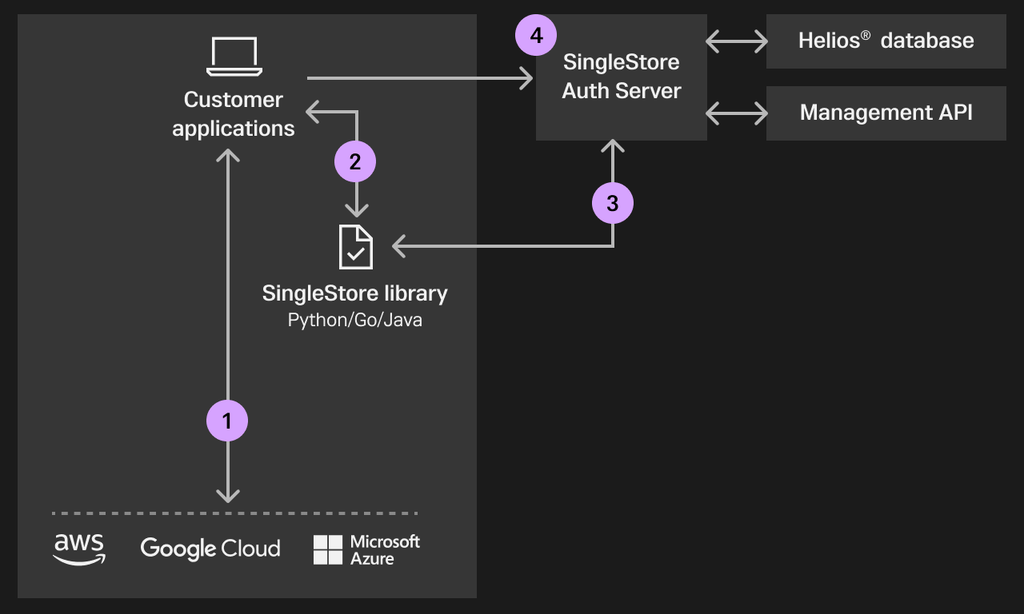
- The customer's server/application requests a verifiable token from the cloud provider that proves it’s running as that role/identity. The application calls the SingleStore auth library with that token.
- The library securely exchanges the cloud token for a short-lived JWT from SingleStore Auth Server which is then used by application to authenticate to the SingleStore Portal.
- Application calls SingleStore Auth Server with JWT which validates and grants access as per the configured authorization (database users/roles configured with JWT and Portal permissions).
What are the pre-requisites for using this feature?
- A cloud role/identity for the server (AWS IAM Role, GCP Service Account, Azure Managed Identity).
- Connectivity from your environment to SingleStore’s authentication service endpoints (/auth/iam/database & /auth/iam/api) (AWS us-east-1).
- Adopt lightweight SingleStore IAM Auth library or REST API (Go, Python, Java, CLI)
- A corresponding SingleStore database user/role mapping for your server/service account identity so that JWT‑authenticated sessions are authorized correctly.
- For the database:
- Create a user whose username is the cloud role identifier
- For the Management API:
- Create a cloud principle user with the cloud principle attribute set to the cloud role identifier
- For both:
- Assign roles and permissions
- For the database:
What success look like during the pilot?
- The library works as intended.
- Application can connect to SingleStore database/Management API without any stored passwords.
- Stable connections over N days with JWT renewal.
- Role identifier appears in audit logs for engine/Portal calls.
- Demonstrated revocation by removing the role’s grants.
Expected outcomes:
- Reduction in secret rotation tasks and break/fix incidents.
- Time-to-revoke access - Revocation is instant for the management API. For the database, existing connections are not affected by revocation but new connections are blocked immediately.
- Audit review time drops (clear identity attribution).
- No performance impact on database operation/usage under extreme load conditions
Reference Links
SingleStore Authentication IAM Library - https://github.com/singlestore-labs/singlestore-auth-iam
https://docs.aws.amazon.com/wellarchitected/latest/security-pillar/sec_identities_unique.html
https://docs.aws.amazon.com/IAM/latest/UserGuide/best-practices.html
https://docs.cloud.google.com/iam/docs/service-account-creds