
SingleStore Notebooks

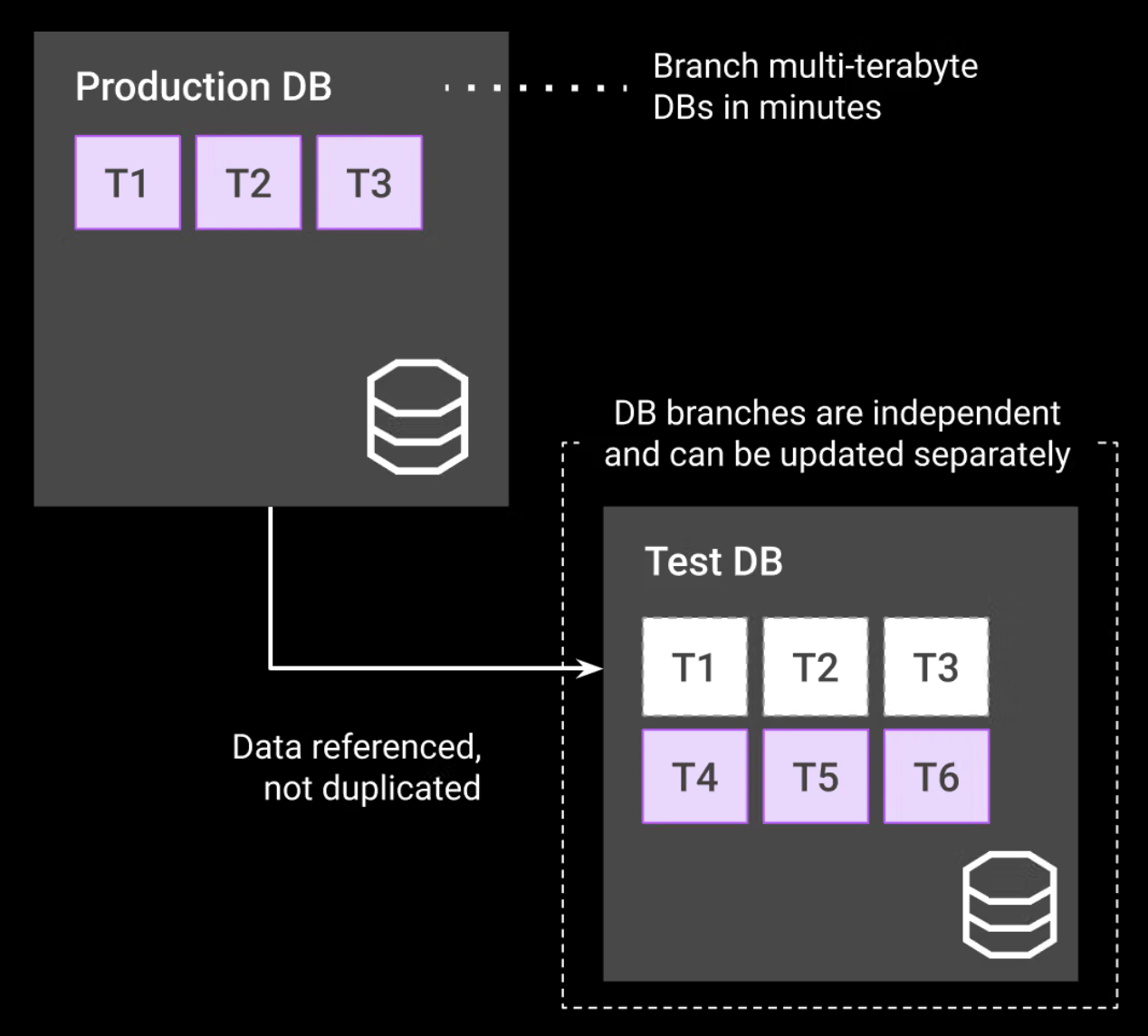
Database branching in SingleStore enables the creation of an isolated copy of an existing database—sharing its history but functioning independently—so you can insert, update, or delete data without impacting the parent database.
It allows rapid creation of isolated environments for prototyping or testing schema changes without disrupting production, and supports point-in-time recovery by branching to a specific timestamp, both improving speed and reducing risk.
Traditional SQL systems required full volume-level clones or long database restores to enable branching or sandboxing. SingleStore integrates branching as a standard feature, enabling rapid, low-cost sandboxing and developer productivity without heavy SANs or long wait times.
Instantly spin up isolated branches with the latest replica of the production database or at a specific point in time.
create a new database branch from the original database to rename an existing database.
You can evaluate multiple versions of your application on a branch, isolating and resolving any issues while the production database remains active.
The Digital Marketing dataset can be generated using the website here: digital-marketing.labs.singlestore.com
Sign up for SingleStore Helios or Login to the portal if you already have account created. You can use SingleStore couments to get started with Helios platform if need more assistance. Getting Started with SingleStore Helios
Make sure your Standard or Premium cluster is running.
Open the website and fill in the connection form: your cluster host with https:// in front (find it under Connect in the portal), username admin, your cluster password, and database name martech. Click Connect.
Click Setup Database. It creates the martech database and starts streaming shopper locations and purchases into it. Keep the Simulator switch on.
Under Locations, tick the cities you want. Each city adds ad campaigns, so more cities give the notebook more ads to search.
Wait until Ad Campaigns shows a number above 0, then come back here. If the connection fails, check that your cluster's firewall allows your IP address.
The notebook only reads from martech. If you skip this step, it loads the same data from the dataset's public S3 bucket instead.
martech database we created earlierIn [1]:
1import singlestoredb as s22from prettytable import PrettyTable3
4# Connection comes from the cluster dropdown at the top of the notebook5with s2.connect() as conn:6    with conn.cursor() as cur:7        cur.execute("SELECT table_name FROM information_schema.tables "8                    "WHERE table_schema = DATABASE() AND table_type = 'BASE TABLE' ORDER BY table_name")9        tables = [r[0] for r in cur.fetchall()]10
11        pt = PrettyTable(['table_name', 'singlestore'])12        for t in tables:13            cur.execute(f"SELECT COUNT(*) FROM `{t}`")14            pt.add_row([t, cur.fetchone()[0]])15
16print(pt)
There are couple of ways to create a branch:
1. Using SingleStore Helios portal
2. Using SQL
The following syntax creates a branch on the same cluster as the parent database:
ATTACH DATABASE <parentDB_name> AS <new_branchDB_name>
We will be following second apporach through the tutorial.
Scenario 1: As a developer, you want to test a new business logic before implementing the query on a production dataset.
In [2]:
1%%sql2## Creating Database Branch using SQL:3
4ATTACH DATABASE martech AS martech_branch;
You can navigate to the requests table within the martech_branch database and test your new business logic without impacting the production dataset. You can insert, update or delete rows, test the performance of your queries etc.
Once done testing, you can simply drop the branch database:
In [3]:
1%%sql2DROP DATABASE martech_branch;
Scenario 2: Branching can use PITR and this requires the database to be deployed using an Enterprise Edition.
Think of a scenario when user accidently delete 5000 records from requests table. You can recover the data by simply creating a branch of your database at a point in time before the bad query was executed.
Note: Please keep in mind that PITR Feature is only available in SingleStore's Enterprise edition. In the Standard edition, you can create a branch by specifying a specific date. The timestamp of the branch is automatically set to 00:00:00 and cannot be modified.
In [4]:
1%%sql2## Creating Database Branch using SQL:3ATTACH DATABASE martech AS martech_branch;
In [5]:
1import singlestoredb as s22from prettytable import PrettyTable3
4# Connection comes from the cluster dropdown at the top of the notebook5with s2.connect() as conn:6    with conn.cursor() as cur:7        cur.execute("USE martech_branch")8        cur.execute("SELECT DATABASE()");           db = cur.fetchone()[0]9        cur.execute("SELECT NOW()");                now = cur.fetchone()[0]10        cur.execute("SELECT COUNT(*) FROM requests"); before = cur.fetchone()[0]11        cur.execute("DELETE FROM requests LIMIT 5000");          deleted = cur.rowcount12        conn.commit()13        cur.execute("SELECT COUNT(*) FROM requests"); after = cur.fetchone()[0]14        cur.execute("SELECT NOW()");                end = cur.fetchone()[0]15
16pt = PrettyTable(['Database', 'Time', 'Before delete', 'Rows deleted', 'After delete', 'End Time'])17pt.add_row([db, now, f"{before:,}", f"{deleted:,}", f"{after:,}", end])18print(pt)
In [6]:
1%%sql2USE martech_branch;3
4SELECT count(*) FROM requests;
In [7]:
1%%sql2
3ATTACH DATABASE martech_branch AS martech_branch_new AT TIME '2026-10-05 21_54_01';
Review rowcount after recovering database from previous state (PITR)
In [8]:
1import singlestoredb as s22from prettytable import PrettyTable3
4# Connection comes from the cluster dropdown at the top of the notebook5with s2.connect() as conn:6    with conn.cursor() as cur:7        cur.execute("USE martech_branch_new")8        cur.execute("SELECT DATABASE()");             db = cur.fetchone()[0]9        cur.execute("SELECT COUNT(*) FROM requests"); count = cur.fetchone()[0]10
11pt = PrettyTable(['Database', 'Total Rows'])12pt.add_row([db, f"{count:,}"])13print(pt)
To recover the data, you may query the missing rows and copy them to the production requests table.
Scenario 3: Alternatively, after creating database branch using PITR, you may drop the martech_branch database and then rename martech_branch_new as martech_branch. (I want to preserve martech database for further use)
Note: when you do this you will have to reconnect this newly renamed requests database to your application.
To drop your existing martech_branch database:
In [9]:
1%%sql2DROP DATABASE IF EXISTS martech_branch;
To rename martech_branch_new as martech_branch:
In [10]:
1%%sql2DETACH DATABASE martech_branch_new;3ATTACH DATABASE martech_branch_new AS martech_branch;
In [11]:
1%%sql2USE martech_branch;3
4SELECT count(*) FROM requests;
Drop the martech_branch database from the cluster(the demo's martech database is left alone).
In [12]:
1%%sql2DROP DATABASE IF EXISTS martech_branch;

Create instant, independent database clones for testing, prototyping, and performance tuning without duplicating storage.
This Notebook can be run in Standard and Enterprise deployments.
Launch this notebook in SingleStore and start executing queries instantly.
This Notebook has been released under the Apache 2.0 open source license.