One of the first customers to use SingleStore Analyst asked it a question that would ordinarily have gone to the data team. It was only the second question the customer had asked Analyst, but when the analysis came back, their head of data said:
“The same analysis would have taken my team two weeks.”
There was no new pipeline to build, ticket to file or sprint to schedule. Analyst queried the data already running the business and returned the analysis in minutes.
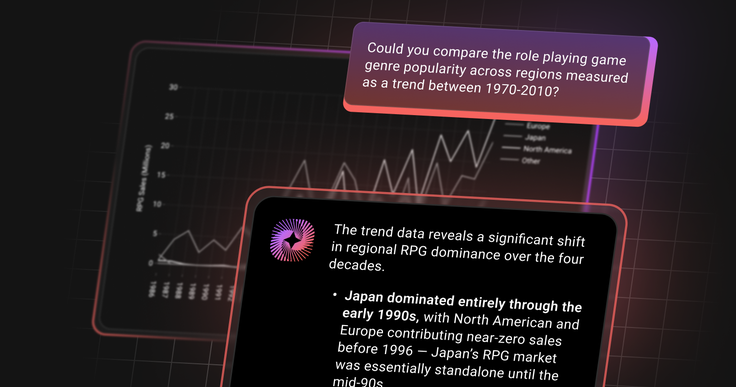
Many useful questions never get answered because they are not important enough to justify two weeks of work. Analyst changes that calculation: users can investigate governed company data in plain language, ask follow-up questions as they learn and get results soon enough to use them.
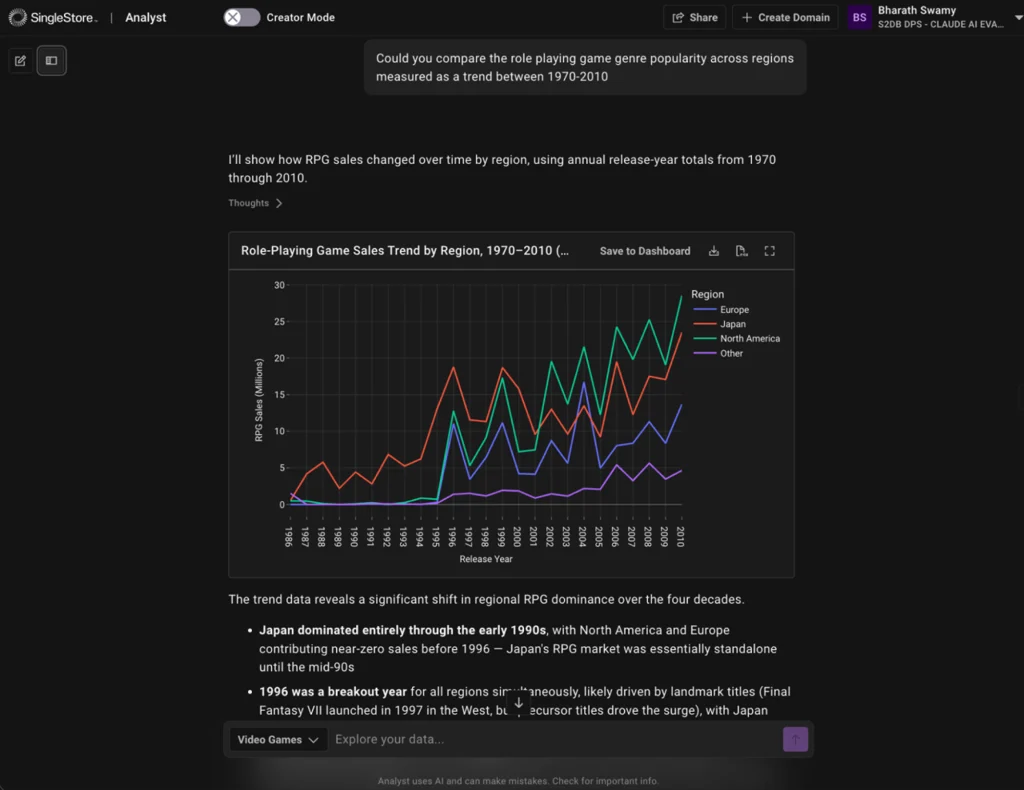
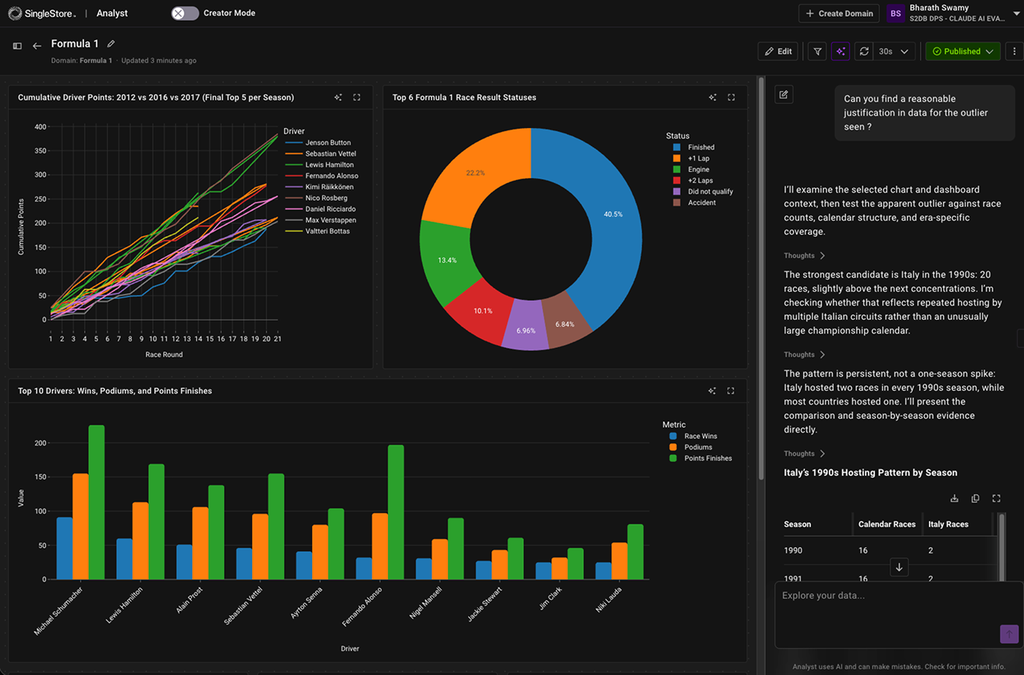
Analyst does more than translate a question into SQL and visualize the result. It interprets what came back, identifying changes, inflection points and differences across the data, then suggests follow-up questions that could explain them. Each answer becomes the beginning of an investigation, rather than the end of a query.
Two ways to put Analyst to work
SingleStore is a distributed SQL database our customers run when their workload has outgrown a single-purpose engine. Live writes and heavy reads on the same rows, multiple data types in one execution path, and read scaling native to the platform rather than bolted on later.
Teams select the tables Analyst can use and add the business context needed to interpret them. Users can then ask questions in plain language, while Analyst handles the SQL, analyzes the results and presents the answer.
For customers whose operational data already runs in SingleStore, that creates a direct path from question to answer. There is no additional system to deploy, no data to move and no second copy to keep synchronized.
Analyst can also run on data replicated from Postgres, MySQL, Oracle, SQL Server or MongoDB. Plain-language access increases the number of people who can query a dataset, and an agent may issue several queries while answering a single question, so concurrency can rise quickly. Replicate the relevant data into SingleStore using Kafka, SingleStore Flow or an existing CDC tool, and SingleStore absorbs that query load while the original database remains the system of record.
Live Intelligence needs three things to be true
Ask anyone who has tried to put an AI agent in front of company data and they will tell you the same three requirements come up every time.
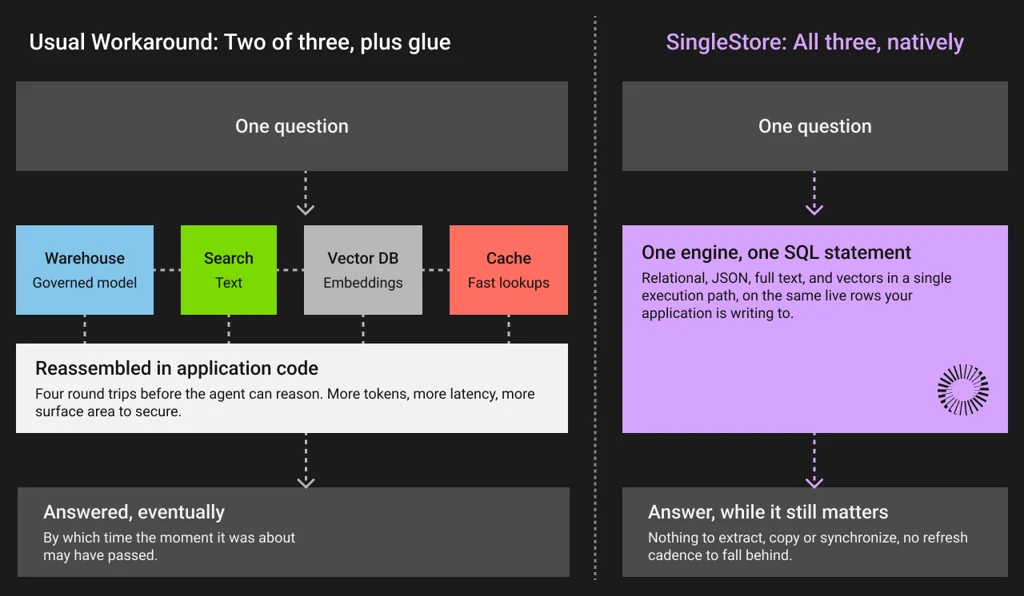
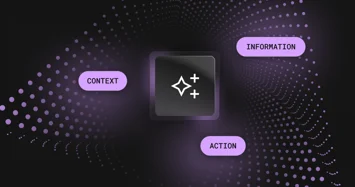
Context grounds each answer in the right data, with your definitions, relationships and permissions intact.
Concurrency allows thousands of users, applications and agents to query at once without waiting behind one another.
Real-time access means answers reflect the data as it is now, not a copy exported last night.
Most architectures can deliver two of the three. Delivering all three usually requires a governed data system plus separate infrastructure for low-latency queries and vector search. Pipelines must keep those systems synchronized, while the application inherits the work of reconciling copies and enforcing access across them. Teams can make this work, but the complexity has not disappeared; it has moved from the database into the application.
SingleStore does all three in one engine by design. Analyst runs directly on your SingleStore databases, on the same rows your application is writing to while the question is being asked. Transactional writes and analytical reads hit the same data, so there is nothing to extract, copy or synchronize, and no refresh cadence to fall behind.
The questions people ask during a working day are the ones where this matters most, and where the difference between minutes-old and right now becomes the whole answer.
What is our fraud rate on the payments landing in the last ten minutes.
How is the promo we launched at nine a.m. actually converting.
Should we reprice this room, this route, this SKU before the next wave of visitors arrives.
Most databases can serve some version of these questions on data that is minutes or hours behind. Some can get closer than that with a Kafka pipeline into a separate analytical store, at the cost of running both. SingleStore serves them on data that is milliseconds to seconds old, on the same rows the application is still writing to. And when someone gets a stale answer without being told it is stale, they stop trusting the tool. Usually quietly, and usually for good.
We built Analyst the same way we are suggesting you build agents on us. Its conversation memory, its knowledge of what your tables and columns mean, its embeddings and its dashboards all live in SingleStore.
Domains are the foundation for great answers
A Domain is a curated set of databases and tables with its own owners, its own users and its own context. It is the unit of scope, the unit of governance and the unit of context. An active Domain needs to be set up before talking to our Analyst. This is a deliberate choice as a question without a scope, is a question Analyst cannot answer with confidence.
One dataset can support separate domains for Finance, Marketing and the executive team. Each domain has its own owners, users, business context and permissions, so every group sees only the data approved for it. This differs from connecting a general-purpose AI assistant to a database with one set of credentials, which can give every user of that connection the same data scope.
Analyst does much of the hard work for you when you create a domain. Analyst starts from the data the creator can already access, automatically indexes the tables you selected, samples the underlying table data and writes a first draft of what every table and column appears to mean. It also creates a dedicated database user for that domain, holding READ permission and nothing else, on only the tables you approved. Remove a table from the domain and the grant is revoked. Delete the domain and the user disappears with it.
Sufficient guardrails are built into the system to prevent unexpected Analyst-generated queries from consuming resources that power your live workloads. Turn on recording and every question, every rating and the SQL behind every answer is there for admin review.
Domains are meant to change. As your data and your business move, owners keep refining scope, meaning and relationships, and the answers move with them.
The Context Engine makes answers trustworthy
Accuracy in general terms of any agentic system is usually a context problem. Accuracy depends on a semantic layer that somebody maintains by hand. When a question strays outside what was curated manually, quality degrades, and without an expensive evaluation setup and a team dedicated to keeping it current, that degradation is very hard to even notice, let alone diagnose.
Plenty of teams in the industry are attacking this with dedicated complex systems bolted alongside their database. Our answer is the Context Engine, and it lives inside the domain rather than beside it. It maps your data, learns your business definitions, applies your permissions and holds conversation memory, so an answer is grounded in what is true in your business right now. It is built once and shared across every interaction in that domain. It is made of a few distinct parts.
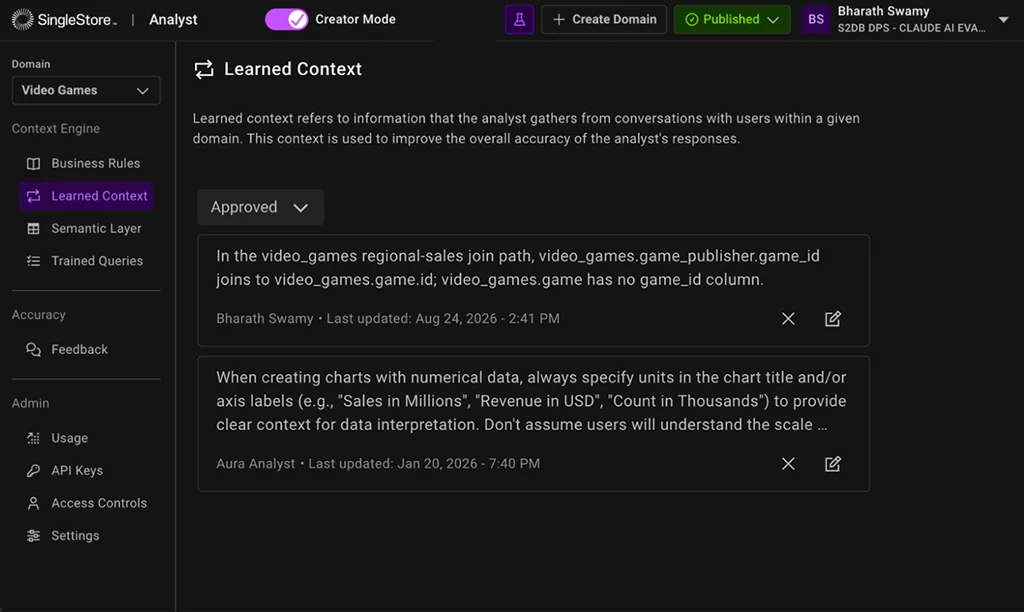
Business Rules is where your company writes down what company specific terminology means. What revenue includes, which accounts do not count, when the fiscal year starts, what your team actually calls things. Analyst answers through it, so a definition holds across every conversation instead of being re-argued question by question.
Learned context is what Analyst pick up from real questions. Analyst proposes it back to a domain admin to approve, reject or edit. Nothing it learns goes live on its own, and that is the point. Your context compounds with use instead of rotting.
The Semantic Layer is the living map of the data itself: which tables are in scope, what the columns mean and how the entities join. Analyst drafts it during domain creation and your team keeps shaping it from there. Joins that Analyst infers arrive with a confidence score and a review queue instead of being quietly assumed, which matters more than it sounds like it should, because inferred joins can go wrong.
Trained queries are the trusted question and SQL pairs you want Analyst to treat as reference patterns. This is how you pin down the exact logic behind the metrics you cannot afford to have wrong.
There is one more layer that customers do not have to maintain at all. Alongside your context, we keep a global store of how to write SQL that runs correctly and performs well on the SingleStore engine, the patterns and idioms that are fast here, and unique abilities of our SQL dialect. Every query Analyst writes is informed by both. The result is queries that are business-aware and engine-aware at the same time, which is a benefit you only get when the agent and the engine come from the same place.
All the context is versioned. You edit a draft, test that draft against the questions that came back wrong last week, compare it against what is published, and publish when it is right. Nobody experiments in production.
That division of labor is what we see working in practice. The people who know the data curate the meaning and confirm the relationships, and everybody else just asks questions. The expertise gets captured once, by the people who actually have it, and then the whole organization gets to use it.
The best insights deserve a stage
A chat interface is very good at answering questions while you are learning and exploring. Most of the business needs something extra. It needs the same question answered at different points in time, every Monday morning for the next two years, which is what BI dashboards were built for.
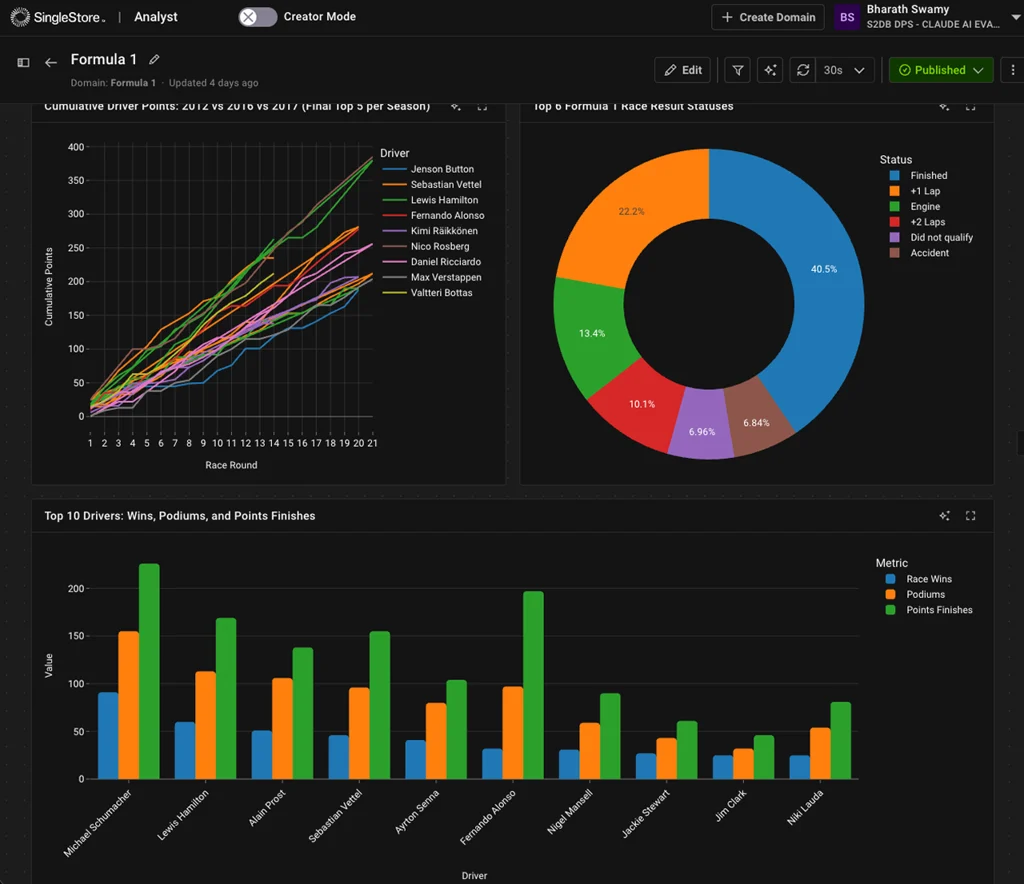
So when Analyst produces visualizations worth keeping, you can pin it straight onto a dashboard and it stays live. What gets saved is not a picture of the result or a copy of the rows underneath it. It is the SQL and the chart configuration. Every time someone opens that dashboard an efficient query runs again against current data. The dashboard is not a record of what was true when somebody built it. It is a window onto what is true now.
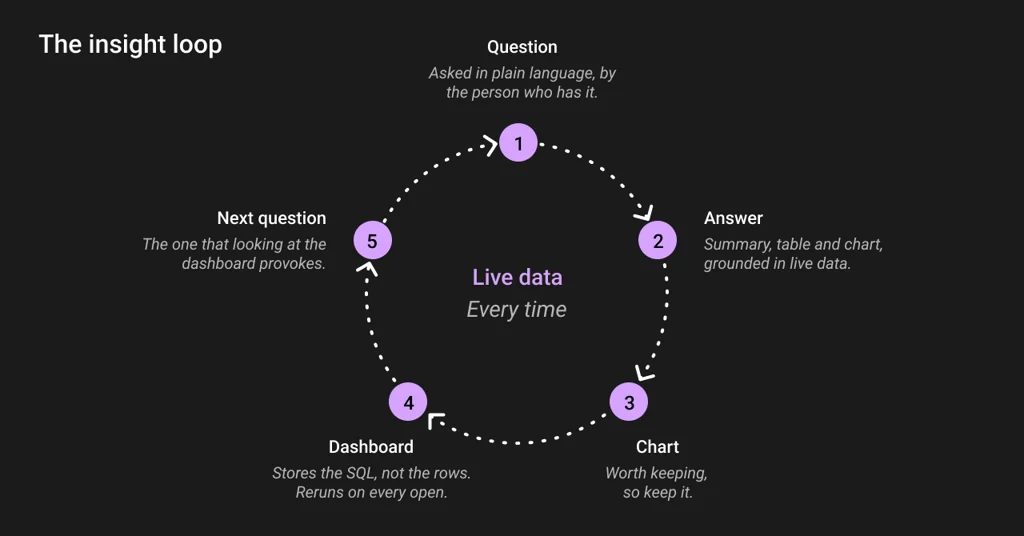
That loop is the part our early customers keep coming back to, and it is where a real-time engine stops being an architecture diagram and starts being something tangible that an executive can see.
Dashboards inherit the access rules of the domain they came from, so there is no second permission model to maintain and no way to hand someone a chart built on data they were never allowed to see.
What we built first, and what comes next
We designed this release for people who have questions about the business but do not write SQL. They can explore the data conversationally, examine results in interactive charts and save useful views to dashboards that remain current. Data experts retain control of the definitions, relationships and query patterns that determine the quality of those answers.
Next, we'll widen the audience by supporting embedded analysis within applications. Governed real time intelligence should be available to everyone, in the interfaces they already work in, and it should be available inside the applications our customers build for their own users. Analyst becomes something you embed inside your product, not a destination your users have to leave it to visit. Serving many of your customers from one system means real isolation between them, and that isolation is built into the engine here, not bolted on above it.
More on that when it is ready. For now, point Analyst at your data, choose the tables it is allowed to read, and ask it something that is happening right now.