Like many teams, we had a spreadsheet that grew quickly in size and complexity as the business scaled. It tracked customer wins, their industry, competitors, and the reasons we’d won, making it an invaluable source of institutional knowledge. Over time, though, it became harder to manage and analyze at scale. Teams found it hard to use, and attempts to query it through third-party AI systems often produced inconsistent or incorrect answers.
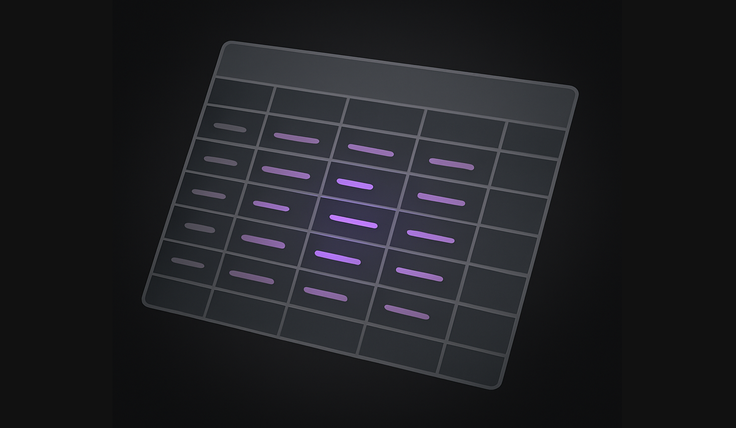
We wanted something smarter, something that combined our structured customer data with the richness of customer quotes, and that could be explored in plain English. We wanted to ask more flexible, non-exact queries, like “customers in Science & Engineering who improved their query performance.” That’s when we turned to SingleStore’s Model Context Protocol (MCP) to experiment with building an AI agent–driven prototype as a first iteration to see how well an LLM, the MCP Server, and our data source could work together in practice.
Getting started with Model Context Protocol (MCP)
SingleStore’s MCP server implementation makes it possible to go from an idea to a working prototype in minutes. It connects MCP clients and large language models (LLMs) like Claude directly to your SingleStore environment, allowing you to issue natural language commands that generate code, schemas, and notebooks. SingleStore handles both structured and unstructured data in the same database, so there’s no need for multiple systems like Postgres and pgvector. Everything, from schema to vectors, lives in a single, high-performance database.
To start, I cloned the SingleStore MCP server repository from GitHub with
git clone https://github.com/singlestore-labs/mcp-server-singlestore.git
This repository contains everything needed to run the Model Context Protocol (MCP) server locally and connect it to a supported MCP client. After cloning, I installed the dependencies using:
1uv sync --dev  2
3uv run pre-commit install
With the environment set up, the next step was to integrate the MCP server with Cursor, my AI powered IDE. This allows an LLM, essentially acting as an AI agent, to directly interact with the model context protocol and build applications through natural language.
To link the two:
1uvx singlestore-mcp-server init --client=cursor2
3uvx singlestore-mcp-server start
At this point, a browser window opened prompting me to sign in to my SingleStore account. After authenticating, the terminal displayed the message “Authentication Successful,” confirming that my environment was connected.
To double-check, I opened Cursor’s Preferences and navigated to
Preferences > Cursor Settings > Tools & MCP
Seeing the singlestore-mcp-server indicator highlighted in green was the moment everything came together as the MCP connection was live, the server was running, and I was ready to begin building directly through natural language commands.

Using the AI agent to design the database
With the MCP Server connected, I copied the original external data source, our CSV spreadsheet, into the same directory. The CSV itself wasn’t complicated, but it contained a mix of structured and unstructured data that made it difficult to query effectively. Each row represented a customer testimonial, with columns such as customer name, industry, revenue range, competitor, pain points with the previous solution, and features that led to our win. It also included a customer quote field, short excerpts from feedback calls or case studies, that captured the nuance behind each deal. Those quotes would later become the foundation for a vector field in the SQL schema, allowing semantic search and similarity matching within the same table as our structured data.
You can use any AI model you prefer for this step. Some model context protocol capabilities, such as elicitation, are not yet available in Claude Desktop but are fully supported in VS Code and related tools like Cursor. I chose Claude 4.5 Sonnet for its responsiveness and contextual accuracy. I then asked Claude, through the MCP integration, to examine the CSV and propose a schema. The LLM parsed the file, identified logical column names, and generated a complete CREATE TABLE statement for me.

It then created each field name including the vector field type:
1CREATE TABLE `customers` (2 `category` varchar(100) CHARACTER SET utf8mb4 COLLATE utf8mb4_bin DEFAULT NULL,3 `customer_name` varchar(500) CHARACTER SET utf8mb4 COLLATE utf8mb4_bin DEFAULT NULL,4 `industry` varchar(200) CHARACTER SET utf8mb4 COLLATE utf8mb4_bin DEFAULT NULL,5 …6 `embedding` vector(1536, F32) NOT NULL,7)
Since I don’t use my SingleStore workspace every day, it was automatically suspended after eight hours to save costs, which caused a bit of confusion at first. Impressively, Claude noticed this, resumed the workspace automatically, and connected me to the correct organization ID. That saved me several steps and showed the potential of MCP when combined with an intelligent AI agent.
Importing and embedding the data
Next, I asked the large language model to write an import script that could read the CSV, connect to the OpenAI API, create embeddings for the customer quotes, and store everything in the SingleStore database. The script used the SingleStore Python client to write rows into a table that included both vector fields and traditional structured columns such as industry, competitor, revenue range, and more.
This is where SingleStore’s approach truly shines. The vector fields live inside the same table and same database as the structured data. There’s no need for dual systems or external vector stores. This unified design meant that both SQL filters and vector similarity queries could run side by side, directly within the same SingleStore environment.
Once the script was generated, I ran it from within the MCP-connected workspace. As expected, the first pass produced a few SQL errors, the LLM had underestimated the maximum string lengths for some columns. But with a quick text prompt, Claude identified the issue, dropped the table, recreated it with correct definitions, and then I reimported the data. The entire debugging process took less than five minutes, all through natural language conversation.
Launch AI-driven features. Without hitting limits.
- Free to start.
- Start building in minutes.
- Run transactions, analytics & AI.
Building a Python notebook with MCP
Once the data was ready, I used the MCP server to have Claude generate a simple interactive Python notebook.
“Please make a singlestore notebook and deploy it on this workspace. It should have fields to query customer_name, revenue_band, ok to mention, and industry as structured fields and then a vector search textinput to search our vector field. You'll need to load the values for the structured fields. It should use drop downs so users select the correct entry.”
Even with this brief prompt, the AI agent created the notebook interface as described. The MCP architecture had access to external tools in the SingleStore platform. Using the model context protocol integration, it created and deployed the notebook directly to SingleStore Helios.
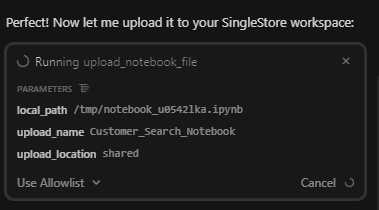
Before running it, I had to remind Claude to include pip install commands for the third-party libraries, like openai, so the notebook would execute cleanly. Once that was fixed, I moved on to setting up my API secret.
Inside the SingleStore Cloud Portal, I created a secret from the Query Editor under the Secrets tab. I provided a name and value for my OpenAI API key and saved it.
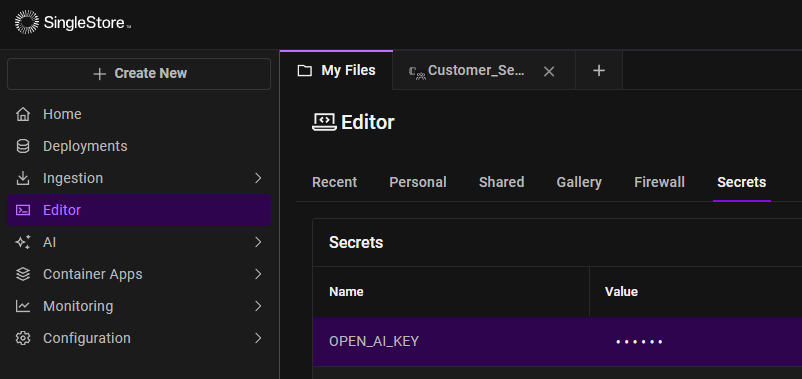
From Python, I retrieved it with a simple snippet:
1from singlestoredb.management import get_secret2secret = get_secret('OPEN_AI_KEY')
With the key securely stored, the Python notebook connected seamlessly to both SingleStore and OpenAI, embedding the user query string and running hybrid searches that combined structured filters (like industry and revenue band) with vector similarity scoring.
In the text box, I can search for benefits like “speed up query time” and the notebook would perform a vector similarity search across the customer quotes stored in SingleStore. This allowed me to instantly surface feedback that mentioned similar themes.
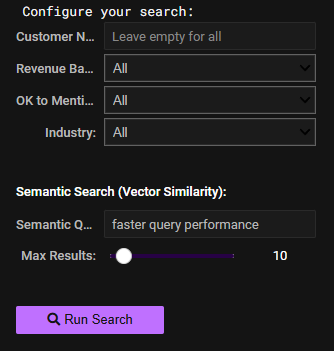
A search for “faster query performance” returned testimonials like “Lightning-Fast Performance”, “Fast queries”, “Reduced query execution”, as well as exact matches.
The structured dropdowns provided quick ways to focus the search, while the vector input made the experience feel closer to natural language exploration. It demonstrated how model context protocol, MCP clients, LLMs, and Python notebooks can work together to build practical, lightweight applications for real data exploration.
The generated notebook is hosted on github.
A turnkey AI application workflow
What impressed me most was how cohesive the experience felt. Using SingleStore’s MCP server, Claude, and the Helios environment, I went from a static CSV to a working Python notebook app in less than an afternoon. There was no Postgres, no pgvector, and no kludgy multi-database setups, just a single platform handling everything: ingestion, embeddings, and interactive querying.
The Model Context Protocol doesn’t just connect models to data, it empowers AI agents and helps the LLM act as a full-stack collaborator, building the scaffolding of functional applications that run inside SingleStore. It makes rapid prototyping practical, especially for ideas that would never make it to the top of a sprint backlog because they’re too small, too experimental, or not worth the engineering time.
This first version focused on turning our competitive spreadsheet into a searchable knowledge app, but the same pattern could accelerate many workflows: customer feedback tools, internal utilities, lightweight reporting apps, even proof-of-concept dashboards. These kinds of projects usually sit on a whiteboard for months because no team has the time to build them. Now, they can be drafted, tested, and iterated in a day.
Looking ahead with AI assistants
In practice, SingleStore’s MCP support, Claude, and the Model Context Protocol gave us a glimpse of what’s coming next: AI-assisted development where prototyping and experimentation happen faster than ever, and where developers can spend more time refining ideas rather than scaffolding them.
.png?width=24&disable=upscale&auto=webp)