Modern day workloads must balance the conflicting demands of the application. The applications are required to have milliseconds of latency in transactional operations, efficient analytical workloads across massive data, and the data flexibility demanded by AI/ML workloads. Traditional architectures force a binary choice between rowstore and columnstore storage formats, each optimized for fundamentally different access patterns.
This guide explores the architectural characteristics of each engine, provides decision criteria for selecting the right format for the workload, and demonstrates how unified storage architectures. This blog further demonstrates how SingleStore Helios examine transactional workloads, analytical scenarios, and the emerging requirements of AI-driven applications.
What is RowStore Storage?
A rowstore in storage refers to a storage format that stores data in rows with all the fields of a row stored together in the same physical location. These are in-memory storages which store data inside RAM rather than disk. This means that each row contains all columns for a single record, stored contiguously in memory or disk.This avoids disk I/O and significantly speeds up data access and manipulation.
How does a rowstore work?
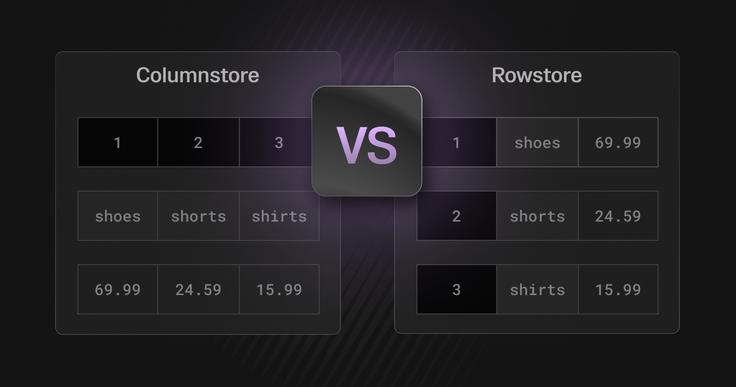
A rowstore stores the data onto the memory by rows, which means, when you insert a record with 50 columns, all 50 columns are written together to the same memory location. Subsequent queries that need multiple columns from a single row retrieve them efficiently because they're co-located.
Where are the Rowstores efficient?
The key advantages that makes the rowstore efficient are:
- Ultra-low latency queries: Row-based storage retrieves an entire record in a single memory access, enabling extremely fast lookups. Indexed queries typically return within 100–500 microseconds.
- High-throughput writes: rowstore supports lock-free concurrency, allowing 500K+ inserts per second per node without blocking read operations.
- Strong transactional consistency: ACID guarantees are built into the rowstore architecture. Multi-statement transactions maintain consistency across related updates without requiring complex coordination.
- Optimized for full-row access: Queries that need most or all columns execute with minimal data movement. For example, selecting 40 out of 50 columns touches almost the same memory footprint as selecting all 50.
- Highly effective indexing: B-tree and hash indexes on primary and foreign keys deliver predictable, sub-millisecond lookup performance, even at large scale.
Where are rowstore storages proved to be efficient?
Rowstore excels in workloads where speed, transactional integrity, and frequent point lookups are critical. It is particularly efficient in:
- Transactional heavy workloads like applications such as banking, payments, e-commerce and user profiles that depend on rapid inserts, updates and precise data retrieval.
- Use cases that require instant decisioning like fraud detection, personalization engines, session management benefit from rowstore’s ability to fetch full records with minimal overhead.
- Operational tables with wide schemas where customer profiles, product catalogs, configurations perform exceptionally well because rowstore minimizes memory movement when returning full rows.
- Writing heavy applications like IoT ingestion, event logging, telemetry, or status tracking pipelines helps inserting at rapid speed.
How to create RowStore tables in SingleStore
Starting with SingleStore version 7.3, rowstore has not been the default table storage format. To create a rowstore table explicitly in SingleStore helios,
1CREATE row store TABLE product_details (2 ProductId INT,3 Color VARCHAR(10),4 Price INT,5 dt DATETIME,6 KEY (Price),7 SHARD KEY (ProductId)8);
In the above command, the shard key controls how the data is distributed in memory. The KEY specified on Price causes an index to be created on the Price column.
It is also possible to randomly distribute data by either omitting the shard key, or defining an empty shard key SHARD KEY(), as long as no primary key is defined. Example:
1CREATE ROWSTORE TABLE products (2 ProductId INT,3 Color VARCHAR(10),4 Price INT,5 dt DATETIME,6 KEY (Price),7 SHARD KEY ()8);
Drawbacks of RowStore
While row store works best for transactional and write heavy workloads, it is perhaps not the first choice of storage for analytics heavy or scan heavy applications. It becomes less efficient in scenarios like:
- Large scale analytical workloads: For queries that require scanning millions or billions of rows such as aggregations, trends, reporting, and dashboards perform significantly slower on rowstore.
- Compressed data storage: row store stores data row-by-row, which limits compression opportunities. For workloads where storage footprint matters, columnstore is more efficient due to better compression ratios.
- Complex analytics: For queries that involve large joins, group-bys, window functions, and CPU-heavy analytical operations, columnstore’s vectorized engine provides superior performance.
What is ColumnStore Storage?
While we have seen where rowstores do not perform the best, column stores are certainly the best choice for such workloads. A columnstore organises data by columns. All values for a single column are stored together, separate from other columns.
Also known as the universal storage, SingleStore makes columnsstore the default table type in SingleStore Helios.
How does ColumnStore work ?
Briefly, when you insert records with 50 columns, the columnstore stores all values of column_1 together, all values of column_2 together, and so on. Column values are compressed and indexed separately.
The SingleStore Helios columnstore is an optimized storage format designed for fast analytics, efficient compression, and scalable performance. It organizes data by columns rather than rows, but includes several structures that improve both analytical and transactional workloads.
The Clustered Columnstore Index: The Core Storage Engine
In SingleStore Helios, a table stored as a clustered columnstore index becomes the primary storage representation of the table. Unlike traditional databases that separate data storage from indexing, SingleStore makes the columnstore index the table itself.
This design minimizes overhead and ensures that analytics workloads operate directly on compressed, column-oriented data.
Sort Keys: The Most Important Optimization Choice
When you define a columnstore index, you choose one or more sort key columns. These columns determine the physical sorting of data inside the columnstore.
Choosing the right sort key is critical because:
- It maximizes segment elimination, allowing the engine to skip irrelevant data ranges.
- It improves range queries, JOIN performance, and filter pushdown.
- It reduces CPU work during large analytical scans.
In practice, users often sort by columns such as timestamp, price, or user_id, depending on the dominant access patterns.
Row Segments: Large Blocks of Logically Grouped Rows
A columnstore table is internally divided into row segments, each typically containing hundreds of thousands of rows. Each row segment includes:
- The row count
- A deleted-row bitmask for transactional updates
- A set of column segments, one per column
This segmentation is fundamental for parallel execution and distributed query performance.
Column Segments: The True Unit of Storage
Each row segment contains a column segment for every column in the table.
A column segment stores:
- All values for that column within the segment
- Metadata such as minimum and maximum values
- Compression-optimized encoding
The min/max metadata enables segment elimination, one of the biggest performance levers. During a query, if a filter cannot possibly match a segment's value range, the system skips that entire block.
This is why SingleStore can scan billions of rows extremely fast and avoids scanning most of them.
Column Groups: Faster Lookups Without RowStore Overhead
SingleStore also supports column groups, an optional structure that materializes full rows in a compact, index-like layout.
Column groups improve:
- Point lookups
- Full-row access patterns
- Update throughput
Because column groups consume far less memory than row store tables, they provide row-like access performance while keeping the table in columnar form.
This eliminates the need to manage duplicated row store/columnstore architectures.
Sorted Row Segment Groups: Maintaining Ordered Ranges
Row segments are grouped into sorted row segment groups, where each group contains non-overlapping ranges of the sort key. More segment groups means more comparison work at query time. These groups grow over time as INSERT, LOAD, and UPDATE operations add new segments.
Managing segment group count is a key part of maintaining long-term performance, and SingleStore provides tools like OPTIMIZE TABLE to merge and rebalance these segments.
Where does ColumnStore work best?
While we have seen how a rowstore storage system fails in certain scenarios, columnStore storage type is the one that outshines in those use cases. Some of the use cases where ColumnStore is considered as the first choice are:
- ColumnStore stores identical or similar values together and enables compression algorithms to achieve 10:1 to 100:1 reduction, thus giving a high compression ratio, lower storage and faster scans.
- ColumnStore storage types are best for high analytical workloads. They reduce I/O dramatically and enable sub-second scans on billions of rows.
- Column-native formats allow CPUs to process many values in a single instruction. This leads to higher throughput, better performance and AI driven analytics.
- Aggregation operations used in analytics become simpler and significantly faster as the engine operates on compressed blocks, storage ranges and single columns vectors.
- They avoid row level locks thus larger scans do not block the lightweight OLTP operations.
- Columnstores distribute column segments efficiently across nodes, enabling applications to scale seamlessly while supporting high ingestion throughput and parallel execution. This helps the cloud native applications reply on SingleStore.
A columnstore delivers lightning-fast analytics, high compression, efficient scans, and scalable performance by storing data column-by-column instead of row-by-row making it the preferred architecture for real-time analytics, AI workloads, and modern data-intensive applications.
How to create a ColumnStore table in SingleStore ?
The default table type in SingleStore is columnstore. The default can be changed to row store by updating the default_table_type engine variable to rowstore. To create a columnstore table in Helios,
1CREATE TABLE products (2 ProductId INT,3 Color VARCHAR(10),4 Price INT,5 Qty INT,6 SORT KEY (Price),7 SHARD KEY (ProductId)8);
The SHARD KEY controls the data distribution. In the above case, the productId is the SHARD KEY since sharding on a high cardinality identifier column generally allows for a more even distribution and prevents skew.
Use cases when columnstore does not perform well
As said in row store cases, there are use cases and scenarios when columnstore tend to perform poorly. Some of these are:
- Application involving heavy writes, updates and detest. Using column stores in these cases could tend to be expensive and utilize more memory.
- For transactional systems that need to retrieve entire rows frequently or perform many small, random lookups, columnstore is inefficient.
- Columnstore tends to perform poorly with smaller tables.
- Updating or deleting specific rows is particularly inefficient since the database must locate data scattered across multiple column segments rather than accessing a single row location.
Difference between RowStore and ColumnStore
Selecting the right storage engine depends entirely on workload access patterns. Row store is purpose-built for transactional workloads that demand microsecond latency, rapid inserts, and full-row access. Columnstore, on the other hand, is optimized for analytical workloads where compression, fast scans, and parallel execution matter most. The table below outlines the fundamental differences to help you choose the right engine for each use case.
| Dimensions | Rowstore | Columnstore |
| How data is stored | Data stored column-by-column; values of each column grouped and compressed | Data stored column-by-column; values of each column grouped and compressed |
| Primary Strength | Ultra-low latency lookups, fast writes, strong transactional consistency | High compression, fast analytics, scalable parallel scans |
| Latency Characteristics | Microsecond-level lookups | Sub-second scans on billions of rows due to segment elimination |
| Write Performance | Extremely high ingestion (500K+ inserts/sec/node), lock-free concurrency | High ingestion but optimized more for read-heavy analytics |
| Query Pattern efficiency | Best for queries retrieving many columns from a single row | Best for queries retrieving few columns across many rows |
| Scalability | Vertical scaling; memory-bound due to in-RAM structure | Horizontal scaling; segments distributed across nodes for parallel execution |
| Concurrency | Ideal for mixed read/write workloads with row-level operations | Avoids row-level locks; large scans run without blocking OLTP |
| Analytical Performance | Slower for large scans, joins, group-bys, window functions | Optimized for vectorized execution and analytical operations |
| Storage footprint | Larger footprint due to limited compression | Much smaller due to columnar compression algorithms |
| Use cases | Banking, payments, personalization, fraud detection, IoT ingestion, operational tables | Real-time analytics, log processing, BI dashboards, feature stores, AI workloads |
Choosing the right datastore for AI workloads
In general, row stores excel at OLTP-like AI workloads: real-time inference, streaming feature updates and low-latency lookups of individual records. They can handle high inserts, give uniform milliseconds response for single key queries. Whereas Columnstores excel at OLAP-like workloads: scanning large feature tables, batch training data preparation, analytics dashboards and vector similarity search. They offer much higher compression, throughput and scalability when queries touch many rows or only a few columns of wide tables.
A common pattern is to use both: keep hot, indexed data in a row-oriented store for speed, and archive or analyze large datasets in a columnar store for efficiency. Modern hybrid systems (e.g. SingleStore Helios) try to unify these, automatically routing transactions into a row buffer and compressing cold data column-wise, or letting you define materialized column groups to cover full-row queries. Ultimately, the right choice depends on your AI workload’s access pattern: if it’s mostly random key/value lookups and updates, lean rowstore; if it’s heavy scans, aggregations, or vector math over millions of rows, lean columnstore.
By matching the storage engine to the workload’s profile, point lookups vs. wide scans, update-heavy vs. read-heavy, data architects can optimize latency, cost, and scalability for AI applications. Let us understand this with a few AI workloads example:
- Real-Time Inference: Applications like fraud detection, building recommendation systems, personalisation engines etc, demand a low latency lookups. These workloads are typically point queries like “get user profile features for this transaction”, which favors row-oriented storage. A row store would excel at random reads and writes, fetching an entire record with minimal latency.
- Feature Engineerings: Feature engineering and feature-store workloads span both large-scale analytics and low-latency lookups. Offline feature computation (joining logs, aggregating historical data) is a classic OLAP task, whereas serving features to live models is OLTP. In this case, columnstore would provide a very high throughput on analytics queries , with tolerable latency. For online feature lookup, a row store is still used to serve low-latency point queries.
- Training on large datasets: For model training workloads that involve reading large volumes of feature data, a columnstore is recommended. It efficiently reads only the required columns and leverages compression to optimize storage and scan performance.
- Vector Search / Embedding Retrieval: Specialized vector store or columnstore with ANN index. Similarity search operates on high-dimensional embedding vectors. Columnar formats can help by storing the entire vector contiguously as a column, so queries read only the embedding column.
However, it is important to note that these recommendations are not one-size-fits-all solutions. Choosing the right storage engine ultimately depends on your specific workload characteristics, performance goals, infrastructure constraints, and cost considerations. Readers are encouraged to evaluate based on real-world access patterns, data volume, latency requirements, and operational complexity.
Start building applications with SingleStore Helios today!!