Introducing a new feature allowing customers to self-serve and configure access to Amazon S3 pipelines free of long-lived static credentials when loading data on AWS-based workspace groups. This removes the need to manage AWS access keys, reducing security risk and simplifying pipeline setup while using AWS-native identity controls.
Pipelines enable loading data into SingleStore from external sources such as Amazon S3. Previously, using pipelines with S3 required providing long-lived static credentials aws_access_key_id and aws_secret_access_key in the pipeline definition or contacting support for a custom, static-credential-free setup using eks_irsa and role_arn. While this custom setup was possible, it was cumbersome- customers had to contact SingleStore support, which in turn had to coordinate with engineering to manually complete the necessary configuration steps.
All AWS-hosted deployments now feature a unique AWS identity known as "Cloud Workload Identity." This allows workspace workloads to use IRSA (IAM Roles for Service Accounts) for secure cloud access, eliminating the need for long-lived static credentials. The Cloud Workload Identity is composed of Kubernetes components and AWS-specific configurations that map to underlying AWS resources. In AWS, the identity is identified by an IAM role ARN. This initiative enhances internal security, reduces reliance on static credentials, and supports new capabilities by aligning with best practices for AWS identity and access.
This feature leverages the IRSA setup and AWS cross-account role delegation. The workspace group-bound role is going to assume a customer’s provided role which has the necessary IAM permissions to read data. To enable this, the workspace group identity must be permitted to assume the customer’s role and vice-versa in order to grant access securely across accounts. For each workspace group, the customer can configure a list of roles that can be assumed by the workspace group, called delegated entities. Each workspace group can have up to 20 delegated entities configured at any given time. An example of this workflow is shown below.
Using this feature, customers get a more secure and maintainable pipeline setup with improved access management: no static credentials to manage or rotate, automatic use of short-lived AWS tokens, reduced risk of secret exposure, and simpler, cleaner cross-account S3 access.
How it works - Quick Walkthrough
To support this feature, new endpoints under ‘Identity’ and ‘Delegated Entities’ have been introduced to the Management API allowing, aligning with modern identity and access management practices and this configuration to be fully automated or done programmatically.
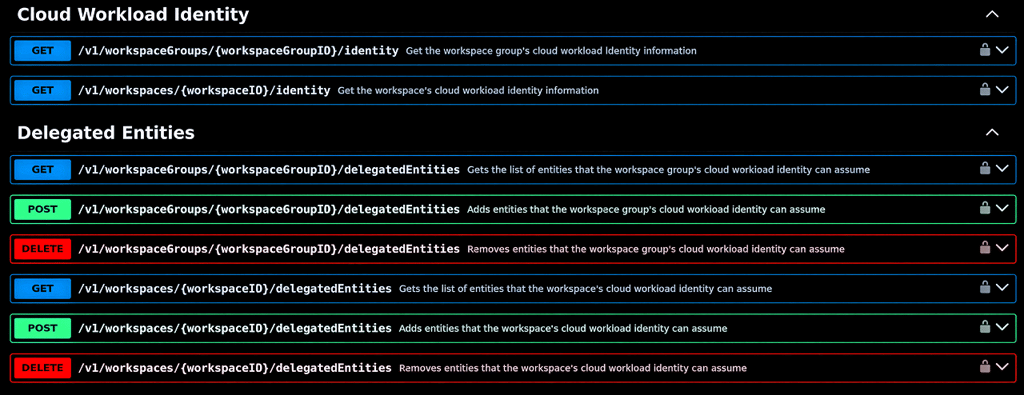
Endpoints exist at the workspace group and workspace level but it is just for a matter of convenience, internally all operate at the workspace group level. The Identity operation allows fetching the workspace group’s identity identifier. Delegated entities are the roles the workspace group’s identity is allowed to assume and can be configured as exact IAM role ARNs or as IAM role ARN patterns when you want to allow a family of roles that share a common naming pattern.
For a manual configuration, a UI component has also been introduced in the workspace group’s Security tab.
.png?width=1024&disable=upscale&auto=webp)
The following demonstrates how to set up this feature for a pipeline. To enable this feature in pipelines, you must specify creds_mode with the value eks_irsa and provide the role_arn for the role to be assumed.
This role, just like the IAM user with static credentials, must be permitted to read from the S3 bucket where the data is loaded with the appropriate Amazon S3 permissions, and additionally allowed to be assumed by the workspace group’s cloud workload identity role.
Inline Policy JSON document
1{2 "Version": "2012-10-17",3 "Statement": [{4 "Effect": "Allow",5 "Action": [6 "s3:GetObject",7 "s3:ListBucket"8 ],9 "Resource": [10 "arn:aws:s3:::<bucket_name>",11 "arn:aws:s3:::<bucket_name>/*"12 ]13 }]14}15
Role’s Trust Relationship
1{2 "Version": "2012-10-17",3 "Statement": [4 {5 "Effect": "Allow",6 "Principal": {7 "AWS": "<workspace_group_cloud_workload_identity_ARN>"8 },9 "Action": "sts:AssumeRole"10 }11 ]12}13
Alternatively, a CloudFormation Stack template can be downloaded from here or specified as an ‘Amazon S3 URL’.
Once the role has been created and fully configured, it must be added to the cluster’s delegated entities. This can be done through the UI or API endpoint and it is effectively granting the workspace group role permissions to assume the delegated entity.
FAQ
Are there any plans to support this feature on GCP/Azure?
Yes
Is it possible to configure the role with an externalID or some other label?
No, not at the moment and there aren’t any plans to implement it.