The difference between OLTP and OLAP is the work each system is designed to do. OLTP (online transaction processing) records and updates individual transactions, such as a customer placing an order. OLAP (online analytical processing) queries many records to answer questions, such as which products sold fastest this week. The distinction is the workload: both kinds of processing can use current data.
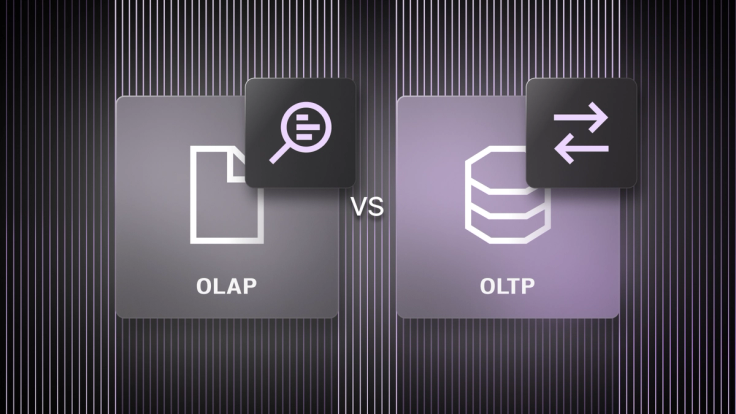
An application may need to do both. Placing an order requires a fast, reliable update; understanding sales across products and regions requires analysis of many orders. The comparison below shows where the requirements differ.
OLTP | OLAP | |
Primary task | Record and update transactions | Analyze data across many records |
Typical question | “Did this order go through?” | “Which products are selling fastest?” |
Typical query | Read or change a small number of records | Scan, join and aggregate many records |
Key requirement | Fast updates and transaction consistency | Efficient analysis of large datasets |
Common storage approach | Row-oriented storage | Column-oriented storage |
How OLTP and OLAP work
Although both solutions are related in terms of being tools for data processing, OLTP and OLAP represent two fundamental paradigms, each catering to specific needs within the data lifecycle.
What is online transaction processing (OLTP)?
OLTP stands for online transaction processing. It's the engine behind the real-time, transactional systems we interact with on a daily basis. An OLTP database handles the short, frequent operations that keep an application running: creating an order, updating an account balance or reserving an item in inventory. A request typically reads or changes a small number of records, while many users may be making requests at once. A few key characteristics of an OLTP database include:
- High-volume, real-time transactions. OLTP systems are built to handle a constant influx of transactions, ensuring rapid processing and immediate updates.
- Data integrity. Maintaining data accuracy and consistency is paramount in OLTP, as even minor errors can have significant consequences.
- Day-to-day operations. OLTP systems are the backbone of daily business operations, managing crucial tasks like inventory control, order processing and customer interactions.
What is online analytical processing (OLAP)?
OLAP stands for online analytical processing. It handles queries that examine many records to calculate totals, compare groups and investigate patterns. For example, an analyst might compare order volume by product and region over the past hour, then drill into a sudden change. Those queries often scan, join and aggregate large amounts of data.
OLAP is commonly associated with data warehouses and historical reporting, but analytical queries can also use data that is updated continuously. Some key characteristics of an OLAP solution include:
- Multidimensional data model. Traditional OLAP systems organize data into cubes for multidimensional analysis, while modern implementations often use columnar storage for better scalability and performance.
- Historical data analysis. OLAP excels at exploring past data to identify trends and support strategic decision making.
- A mix of batch and real-time updates. While traditional OLAP systems operate on periodic data snapshots and batch updating, modern platforms increasingly support real-time analytics through real-time change data capture, commonly referred to as CDC.
Key differences between OLAP and OLTP databases
The comparison comes down to more than the size of a query. Data freshness, storage format and concurrent demand also shape how a database handles each workload between OLAP and OLTP. These differences are especially important when an application needs to analyze transactions soon after they are written.
Real-time transactions (OLTP) vs. historical analysis (OLAP)
- The purposes and functionality of OLTP and OLAP systems diverge significantly. OLTP systems are geared towards handling immediate, transactional data, ensuring smooth and efficient business operations.
- By contrast, OLAP systems are designed for retrospective analysis, helping users extract meaningful insights from accumulated data. Often, these insights aren't even delivered in real time, leading to a delay that might not be acceptable for systems relying on real-time insights. In such cases, an OLTP solution would be a better fit.
Write-heavy workloads (OLTP) vs. read operations (OLAP)
- OLTP systems prioritize write operations, as they constantly need to update data based on incoming transactions. This keeps these high-traffic data sources relatively busy managing issues like data concurrency.
- OLAP systems, in contrast, are optimized for read operations, facilitating complex queries and data exploration.
High-volume transactions (OLTP) vs. large-scale data analysis (OLAP)
- OLTP systems handle numerous and often smaller transactions, ensuring each is processed quickly and accurately.
- OLAP systems are designed to manage and analyze data at scale, enabling users to uncover patterns and trends within vast amounts of information.
Data sources and updates
When it comes to the sources of the data in each system, things can vary quite widely. For instance, an OLAP database might be fed data from other OLTP databases. The difference in data freshness comes from where analytical queries run and how data reaches them:
- OLTP database: Applications write operational data as events occur, such as placing orders or changing inventory counts.
- Separate OLAP database or data warehouse: Batch jobs, change data capture (CDC) or streaming pipelines bring that data over. A nightly batch creates a delayed view; continuous ingestion makes recent changes available sooner.
- One database for both workloads: Analytical queries can use the data being updated by transactions without first transferring it to another database.
OLTP and OLAP cater to distinct needs within the data management landscape. OLTP ensures the smooth flow of daily transactions, while OLAP empowers users to look into historical trends within the data stored for strategic insights. Because of these differences, there's also a wide gap in the types of storage and architecture that each system provides.
Data storage and architecture
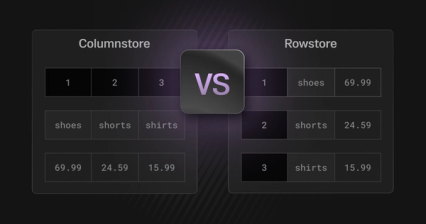
Storage choices reflect how a database accesses data. Row-based storage keeps the fields of a record together, which suits frequent lookups and updates to individual records. Column-storage storage groups values from the same field, allowing an analytical query to read the columns it needs across many records. It also creates opportunities for compression. Rowstores are a common fit for OLTP workloads and columnstores for OLAP, though databases can support both kinds of work with other storage and indexing designs.
Data volume alone does not define either workload. A transactional database may retain years of orders, while an analytical query may examine only this morning’s activity. OLAP cubes are one way to model data for analysis; row and column storage describe how a database physically organizes it.
Who uses OLTP and OLAP?
People encounter OLTP through the applications they use: customers place orders, staff update inventory and services change account records. Those operations must stay fast and correct when many users act at once. OLAP serves people examining activity across many records, such as an analyst comparing stockouts by product and region. It can also power dashboards inside operational applications, so its audience extends beyond analysts.
When both workloads run at once, analytical queries need enough resources to finish promptly without holding up transactions. The application also needs a clear answer to how current and consistent the data in each query will be.
OLAP applications and types
OLAP systems play a crucial role in various analytical and decision-support scenarios. When it comes to witnessing OLAP at work in the real world, some of the best ways to leverage it include:
- Data warehousing. OLAP is often used in conjunction with data warehouses to provide a centralized repository for historical data analysis.
- Business intelligence. OLAP powers many business intelligence tools, enabling users to create interactive reports, dashboards and visualizations.
- Executive decision making. OLAP systems provide executives with the insights they need to make informed strategic decisions.
Among the umbrella of OLAP, there are also a few different subtypes of OLAP systems to be aware of. These include:
- ROLAP (relational OLAP). ROLAP systems leverage a relational database to store and manage multidimensional data.
- MOLAP (multidimensional OLAP). MOLAP systems store data in specialized multidimensional arrays, optimized for fast query performance.
- HOLAP (hybrid OLAP). HOLAP systems combine aspects of ROLAP and MOLAP, offering a balance between flexibility and performance.
- DOLAP (desktop OLAP). Though less common today, desktop OLAP was historically used for offline analysis by storing data locally.
- WOLAP (web OLAP). WOLAP systems provide access to OLAP functionality through a web browser.
OLAP systems, with their diverse types and applications, offer powerful capabilities for data analysis and decision support. Let’s now turn our attention to OLTP applications and examples.
OLTP applications and examples
OLTP databases really are the driving force behind many critical business and consumer applications. To give some examples, you'd likely see an OLTP system behind applications including:
- Online banking systems. OLTP systems power the real-time transactions that occur in online banking, including balance inquiries, fund transfers and bill payments.
- Airline reservation systems. OLTP systems manage the complex process of booking flights, seat assignments and ticketing.
- eCommerce platforms. OLTP systems handle the entire transaction lifecycle in eCommerce, from product browsing and shopping cart management to order placement and payment processing.
OLTP systems, through their ability to handle high-volume, real-time transactions, are an essential piece of most application architectures.
ETL and data pipeline optimization
While OLTP and OLAP systems have their unique functions, they often work hand-in-hand through a process called ETL (Extract, Transform, Load). ETL processes extract, clean and transform transactional data from OLTP systems for analytical use in OLAP environments. Modern ELT (Extract, Load, Transform) workflows, where transformation happens post-loading, are increasingly popular for faster processing.
In the ETL process, data is first extracted from various OLTP sources like transactional databases and operational systems. Next, this extracted data undergoes transformation. It's cleaned, standardized and restructured into a format that's suitable for OLAP analysis. Finally, the transformed data is loaded into an OLAP data warehouse, creating a centralized repository where it can be queried and analyzed to uncover valuable business insights.
As mentioned, ELT is also becoming a popular alternative to traditional ETL, where the data is extracted from a source, like an OLTP database, and loaded into the target OLAP platform. Then, on the OLAP platform, the data is transformed as required. This more modern approach to processing data is a staple for platforms like Snowflake and SingleStore.
Ultimately, ETL, ELT and data pipeline optimization enable organizations to actually extract insights from transactional data captured in OLTP systems within the OLAP systems that excel at analytics. Platforms like SingleStore also have many solutions built into them that can help with this critical step in bridging the gap between using OLTP and OLAP platforms together. As the last part of this blog, let's look at how SingleStore handles OLTP, OLAP and ETL processes — all within a single platform.
No more OLAP vs. OLTP: Do it all with SingleStore
Do you really need to decide which platform is the right one for your use case and then hook up a bunch of complex ETL pipelines to get the data where it needs to be? Why not just do everything in one place? SingleStore provides the best of both worlds, efficiently handling all of the complexities and arriving at the same result.
The SingleStore database can be used as an OLTP system, allowing for transactional data to flow in and out at ultra-fast speeds. It can also be used as an integrated OLAP platform, leveraging the OLTP data that's already within the system, or as a standalone OLAP system. It can also support other database models, including vector, in-memory or geospatial use cases, making it truly one-size-fits-all for your data needs.
To further enhance its capabilities, SingleStore also offers both SingleStore Pipelines and SingleStore Flow to facilitate any ETL and ELT needs. No need for external tooling and the associated costs when you have a platform that contains every piece you need to simplify your OLTP and OLAP data integrations. You can learn more about our data integration capabilities here.
Choosing between OLAP and OLTP
OLAP and OLTP are two distinct — yet complementary — data processing systems. Each is designed to tackle unique data challenges and support specific business needs.
- OLAP. Focuses on analyzing and extracting insights from large volumes of multidimensional data, aiding strategic decision making
- OLTP. Manages and processes high-volume, real-time transactions, ensuring smooth and efficient business operations
While both technologies rely on structured data storage and prioritize data consistency, their use cases and requirements differ significantly. Choosing between OLAP and OLTP depends on your organization's specific data challenges. OLAP is ideal for analyzing historical data to uncover trends and patterns, while OLTP is best for managing and processing real-time transactions.
But what if you didn't need to choose between these paradigms? With SingleStore, you can begin using the platform for either OLTP or OLAP workloads with the ability to merge everything into a single platform whenever you feel the time is right. No more OLAP vs OLTP — just one platform to handle any and every workload you can throw at it. Want to get started? Sign up for a free trial today, or contact our team to learn more.
Frequently Asked Questions