
.png?width=24&disable=upscale&auto=webp)
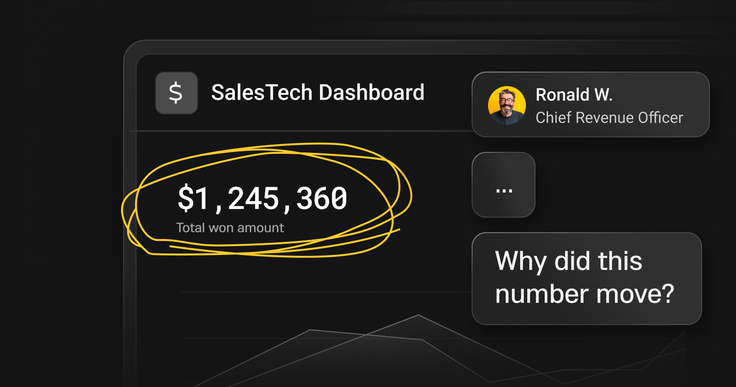
Sales leaders don’t wake up thinking about pipelines, query plans, or storage tiers. They wake up thinking about confidence - confidence in their revenue intelligence, that sales reps are running the right plays, and that the last five calls didn’t quietly turn a “commit” deal into a “slip.” I’ve watched this uncertainty surface in forecast calls more times than I can count.
That tension is why modern SalesTech - and modern revenue intelligence platforms used by sales operations teams in particular - are converging on a deceptively simple product experience: the ability to move from pipeline to deal to call to snippet in just a few clicks, while the insight is still actionable. It sounds obvious, yet it’s exactly where most platforms quietly fall apart.
I’ve started calling this click-to-clarity. And behind it is a truth I’m seeing across revenue tech: data speed is no longer just an infrastructure detail, it’s increasingly the product itself, and a defining lever for revenue operations teams driving sustainable revenue growth.
Speed is the feature (because “data is the lifeblood” isn’t enough)
A lot has been written about how data is foundational to modern sales, and it’s true. Activity data, intent signals, engagement data, product usage, and outcomes—all forms of customer data—shape how teams prioritize and execute. (If you want a solid perspective on this, Patagon’s take on why data matters in modern sales is a good starting point)
But here’s what I see in practice: SalesTech companies rarely lose because they lack data.
When sales teams can’t access revenue intelligence fast enough to answer real questions, the data may exist—but it might as well not. They lose because the data is slow:
Slow to arrive (batch windows, delayed processing, “tomorrow’s truth”)
Slow to query (timeouts, spiky latency, dashboards that stall under load)
Slow to drill down (context switches across tools, datasets, and permissions)
When that happens, your product stops answering the question CROs actually care about: Is the forecast real? And can I prove it without asking five people or exporting a spreadsheet?
Dashboards may show “up and to the right.” But leaders want the why behind the number: which deals are driving the commit, what changed this week, and whether the underlying conversations support the story.
If users can’t move from the roll-up to the source of truth fast, they will do what people always do: fall back on instinct, listen to the loudest rep, or revert to last quarter’s mental model.
It’s not a data problem. Instead, it’s a speed problem.
Define “data speed” the way your users feel it
When engineers talk about speed, we often jump straight to query time. But revenue operations and sales operations teams experience speed as an end-to-end loop:
Freshness: how quickly events become queryable
Latency: how quickly the UI answers a question for sales reps or managers
Drilldown integrity: how smoothly users can move from aggregate revenue metrics → detail without friction
A simple way to frame it: Data speed = (event → queryable) + (click → answer) + (dashboard → truth)
In plain terms: how long sales reps and sales operations teams wait before they get the most up-to-date truth.
If any leg is slow, the whole experience feels slow. Then, your “revenue intelligence” feels like a report.
And in SalesTech, “slow” isn’t just annoying. It’s expensive.
Why speed matters (beyond “nice UX”)
1) Timing economics compound
Sales has always rewarded fast follow-up. But we also have research that quantifies the penalty for delay. The classic Lead Response Management findings show dramatic drops in contact and qualification rates when response time stretches from minutes to tens of minutes. One example widely referenced is MIT/InsideSales study.
Whether you debate exact multipliers or not, the directional truth holds: timing is a force multiplier.
In SalesTech terms, this is the difference between a signal that helps sales reps change a deal and one that shows up later as trivia.
If your product surfaces insights after the moment to act has passed, you don’t just lose analytics, you lose the window where the deal is still steerable. In a modern sales process, speed determines whether insight fuels revenue growth or becomes hindsight.
2) Humans forget quickly
Even when teams intend to review call details later, memory decays fast without reinforcement. Anyone who’s tried to reconstruct a deal from notes two days later has felt this firsthand. That’s not just an opinion; it’s been replicated in modern analyses of Ebbinghaus’ forgetting curve.
In practical terms: if the “real story” of a deal lives inside calls, objections, and buying signals, insights that show up hours or days later are simply too late to matter.
3) Trust is a performance characteristic
I’ll be blunt here: slow dashboards get ignored.
You can almost feel the moment it happens.
The first time a manager clicks into a deal and waits… and waits… they've been trained to do something else. Impatience leads sales operations teams to asking reps directly, exporting to spreadsheets, or pulling reports from another system.
At that point, your product hasn’t just slowed down. It has lost the room.
What changed: conversation intelligence + agentic workflows demand real-time truth
SalesTech is evolving beyond engagement into conversation intelligence, coaching, forecasting confidence, and increasingly agentic assistance—systems that don’t just summarize, but recommend and act.
This raises two requirements:
Requirement #1: The system has to see what’s happening now
Live intent detection is only valuable if it’s timely enough to change outcomes while the conversation is happening – or immediately after.
Requirement #2: Post-call analytics must be interactive
Conversation intelligence isn’t a static PDF summary. Revenue leaders want to compare patterns across sales reps, isolate risk on key deals, and inspect the exact snippets behind forecast changes.
That’s a drilldown-heavy, concurrency-heavy analytics workload for sales operations teams. And this is where most reporting-first stacks quietly fall apart.
The architecture pattern for “click-to-clarity”
If you want a pipeline → deal → call → snippet without lag, you need three things working together.
1) Low-latency ingestion (no “overnight truth”)
Your product needs a continuous path from event streams (calls, CRM events, product signals) into an analytics layer that’s queryable immediately.
This is where streaming and near-real-time ingestion patterns matter.
For example, SingleStore supports continuous ingestion via Pipelines (Kafka, object storage, cloud storage, etc.), so data can be loaded and queried without stitching together extra tooling.
2) A unified store that reduces “truth fragmentation”
SalesTech data is not purely analytical. It’s operational, fast-changing, and deeply tied to workflows.
If your architecture splits everything into operational DB for transactions, warehouse for analytics, and vector store for similarity searches, you’ll spend a disproportionate amount of time syncing data, reconciling inconsistencies, and debugging what is supposed to be the “source of truth.”
A more unified architecture reduces data duplication, inconsistent semantics, and latency introduced by movement and transformation
This is why real-time analytics platforms exist in the first place: to keep operational and analytical data close enough that “truth” stays consistent and fast. If you want a clear overview of what a real-time analytics database is (and why it’s different from a “warehouse + BI” approach), SingleStore’s explanation is a good starting point.
3) Multi-model support for how conversation data actually looks
Conversation intelligence data is messy, comprising of heterogenous data that can is structured (accounts, opportunities, stages, timestamps), semi-structured (JSON metadata, extracted entities, coaching signals), and unstructured-derived (embeddings for similarity and retrieval).
If users feel that fragmentation, they experience it as slowness—even if each system is fast on its own.
SingleStore supports retrieval workflows that power modern AI experience using vector data and indexed ANN search.
The principle is simple: minimize “data travel time” so your product stays interactive.
Case study: Outreach powers real-time conversation intelligence with SingleStore
Outreach is best known as a sales engagement platform that sits on top of CRMs. As the platform expanded into conversation intelligence, that positioning created a new set of technical and product requirements.
Specifically, Outreach needed to support two distinct—but tightly connected—modes of intelligence:
In-call intelligence, where intent needs to be detected fast enough to be useful while the conversation is still happening.
Post-call intelligence, where rich conversation artifacts and derived insights must be persisted and made queryable for deep analysis, coaching, and forecast confidence.
This is the point where data speed stops being just an infrastructure concern and becomes a core part of the product experience.
Revenue leaders don’t just want a dashboard. They want to validate the number. In practice, that means being able to start at a forecast view, then drill into the deals driving the commit, open the conversations behind those deals, and find the exact snippet that supports (or contradicts) the rep’s story.
Outreach has talked openly about this evolution in a fireside chat with SingleStore, describing how AI-driven revenue workflows depend on simplifying the underlying technology for end users and making insight drilldowns actually usable in real workflows.
In that discussion (and in my own conversations with teams building similar products), the win isn’t “faster SQL” for its own sake, it’s what that speed unlocks:
“Being able to get data that’s fresh and instantaneous—and reducing our query latency tremendously—helped our developers build analytics our managers and RevOps teams can use to get instant access to data.”
That’s the key takeaway for SalesTech builders:
If your conversation intelligence workflow isn’t interactive, it won’t change behavior. And if it doesn’t change behavior, it won’t change outcomes.
Real-time data isn’t a buzzword—it’s a usability requirement
To make “real-time” concrete, I like how Rox frames the difference between batch-based data and live data in the context of modern sales execution.
The argument is straightforward: batch data tells you what already happened, while real-time data supports decisions while they still matter. In practical terms, that shows up in familiar sales workflows—immediate lead scoring, live performance monitoring, dynamic pricing adjustments, and more personalized buyer engagement based on what’s happening right now, not yesterday.
What’s important here is the implication. Real-time isn’t just a pipeline or ingestion metric; it’s what makes sales tools usable in the moments teams actually operate—between calls, during active deal cycles, and under forecast pressure.
As Rox puts it:
“Real-time data isn’t just about visibility; it empowers sales teams to act in the moment, turning raw signals into prioritized opportunities and decisive action.”
That’s the throughline across the examples in the article. Whether insights are surfaced by rules, dashboards, or AI-driven workflows, their value depends on timing. If insight arrives after the decision is already made, it may be technically impressive—but it won’t change behavior.
And in SalesTech, that’s the line between analytics that get used and analytics that get ignored.
Proof that speed compounds: Factors.AI and the time-to-value flywheel
Factors.AI offers a clear illustration of what happens when you remove speed bottlenecks from the stack. They reported going from 2–5 minutes to ~20 seconds for queries on 50 million records—about 30x faster—after moving to SingleStore. Check out their story here.
More interesting than the headline number is the downstream effect:
work that used to take days collapsed into minutes
teams iterated faster
time-to-value improved
That same flywheel is what SalesTech companies want: faster data → more usage → better outcomes → stronger retention
A practical playbook: where to start (without boiling the ocean)
If you’re building (or modernizing) a SalesTech platform, here’s a pragmatic way to apply this:
Step 1: Pick 2–3 revenue-critical loops
Examples:
lead response + routing
forecast inspection + risk detection
coaching insights + rep enablement
account signal monitoring + next-best action
Step 2: Define speed SLAs in user terms
Don’t start with “our warehouse refreshes hourly.”
Start with:
“New call artifacts are queryable within X minutes”
“Deal drilldowns return within Y seconds at P95”
“Dashboards stay interactive at Z concurrent users”
Step 3: Instrument the latency budget end-to-end
Break your loop into:
ingest latency
transform/feature latency (if applicable)
query latency
application/UI latency
You usually find one step will dominate.
Step 4: Reduce stack fragmentation where it creates latency
If your product requires multiple stores to serve one drilldown path, you’ve created a speed tax.
This is where platforms designed for real-time analytics can simplify the backbone so “truth” is consistent and fast.
If you want a sense of the kinds of in-app, drilldown-heavy workloads real-time analytics is built for, this page is a useful overview.
Step 5: Validate with a drilldown-heavy workload (not a canned benchmark)
In SalesTech, the make-or-break test almost consistently include real concurrent users, repeated drilldowns, and data that’s continuously arriving while queries are running.
Benchmark what your users actually do: pipeline roll-ups, slice-and-dice filters, deep drilldowns, and “show me the exact evidence behind this trend.”
Closing: build revenue confidence, not dashboard theater
SalesTech is evolving into systems of action, not just systems of record.
The products that win won’t be the ones with the prettiest charts. They’ll be the ones where sales teams can trust their revenue intelligence enough to act—while the moment still matters.
If you’re building toward click-to-clarity, pressure-test your stack with one question:
Where does speed break freshness, query latency, or drilldown integrity?
When users hesitate, wait on a spinner, or stop drilling down, that’s where speed starts to matter. Fixing those moments is where speed turns into value.
If you want to go hands-on, here’s a walkthrough I wrote on keeping operational data close to analytics by integrating MySQL RDS into SingleStore. And if you’re evaluating SingleStore for real-time, drilldown-heavy analytics experiences, start here.






.png?width=24&disable=upscale&auto=webp)
